
What is Routine?
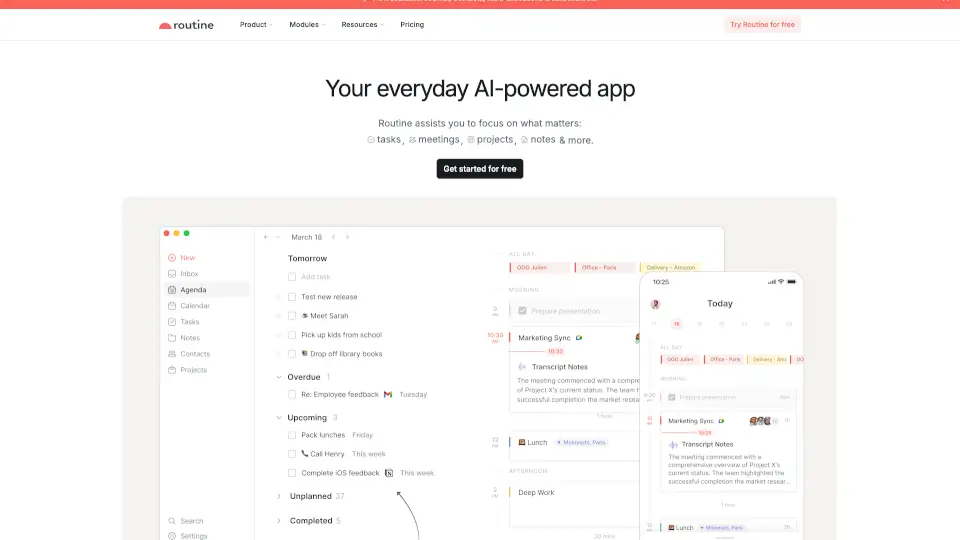
Routine is an all-in-one productivity app that brings your tasks, calendar, and notes together in one smart workspace. Powered by AI, it helps you capture ideas fast, plan your day, and focus on what really matters—without jumping between a dozen different tools. Whether you're a freelancer, startup founder, or part of a growing team, Routine adapts to how you work and automates the busywork.
What are the features of Routine?
- Unified Workspace: Combine tasks, meetings, projects, and notes in a single dashboard—no more switching between apps.
- AI Meeting Notes: Automatically summarize meetings and turn action items into tasks. Works on all platforms without a bot.
- Quick Capture: Use a desktop hotkey to create tasks instantly, add context, and keep moving.
- Universal Inbox: Centralize tasks, messages, and notifications from all your services in one place.
- AI Voice Assistant: Dictate reminders and tasks hands-free when you're on the go.
- Time Blocking & Planner: Plan your day with a visual calendar and block time for your most important work.
- Labels, Priorities & Projects: Organize work your way with custom labels, priority levels, and project folders.
- Bidirectional Integrations: Sync seamlessly with Google Calendar, Todoist, Notion, and 18+ other tools.
What are the use cases of Routine?
- Founders can centralize team tasks, meeting notes, and deadlines to stay focused on growing the business.
- Freelancers can manage client projects, track billable hours, and capture ideas fast without juggling separate apps.
- Startups can replace multiple tools (like Notion, Asana, and Google Calendar) with one extensible workspace, reducing costs and saving time.
- SMBs can scale operations by adding custom databases and AI agents to automate repetitive workflows.
- Busy professionals can use the AI meeting notes feature to never miss an action item again—just record and let Routine summarize.
How to use Routine?
- Start capturing: Press the desktop hotkey (or use the mobile widget) to instantly create a task or note without leaving your current window.
- Plan your day: Open the Planner view to see your calendar events and tasks side‑by‑side, then drag tasks onto the timeline for time blocking.
- Delegate to AI: Use the AI assistant to ask "Remind me to review the proposal tomorrow at 10 AM" or "Summarize my last meeting notes."
- Connect your tools: Go to Integrations and link Routine to your existing calendars, task managers, and communication apps—data syncs both ways.
- Organize with labels: Create custom labels (e.g., "urgent," "personal," "client X") and assign priorities to quickly filter and focus.