
What is Kira AI Art Generator?
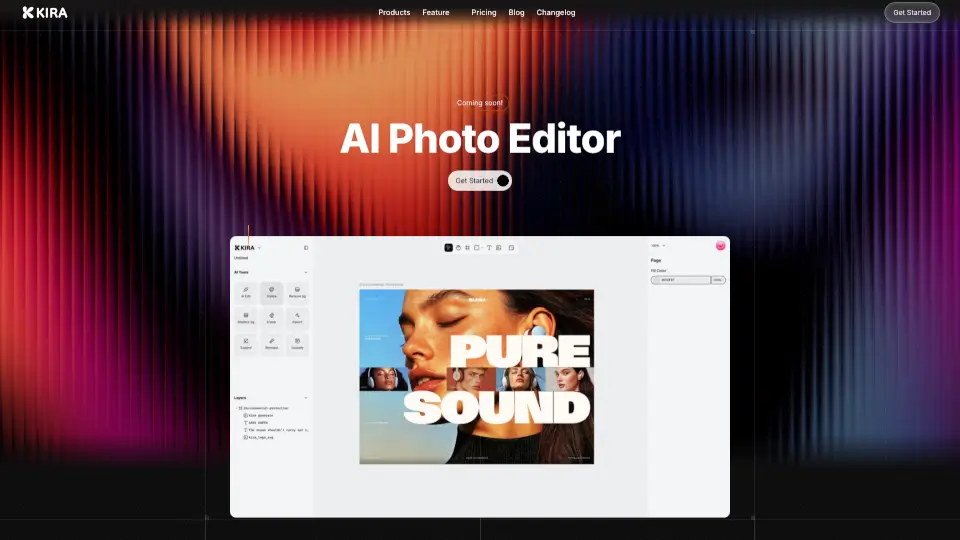
Kira - AI Photo Editor is a powerful, web-based design tool that combines the best of raster and vector editing with the magic of AI. It's perfect for visual designers who want to create stunning graphics without the hassle of downloading software or saving files. With Kira, you can design on any device, collaborate with others, and access a wide range of tools and features, all powered by advanced AI models. Whether you're a professional designer or just starting out, Kira makes it easy to bring your creative ideas to life.
What are the features of Kira AI Art Generator?
- Fully Featured Raster WorkspacesEnjoy a comprehensive set of tools for color adjustment, blend modes, masks, and lasso, all built into one intuitive interface.
- Fully Featured Vector WorkspacesGet access to pen, shapes, and all the vector tools you need, right at your fingertips.
- On the WebNo need to download anything—use Kira on any platform or device, and your work is always saved in the cloud.
- AI-Powered ToolsIntegrated with advanced AI models like OpenAI, Ideogram, and Nano Banana, Kira offers continuous updates and improvements.
- AI Image GenerationGenerate any material you need, from backgrounds to complex designs, with just a few clicks.
- AI EraserClean up your images by removing unwanted elements, making your designs look polished and professional.
- UpscaleQuickly and losslessly enhance the clarity of your images, making them look sharper and more detailed.
What are the use cases of Kira AI Art Generator?
- Creating Social Media GraphicsDesign eye-catching posts and ads for Instagram, Facebook, and other platforms.
- Editing Photos for PortfoliosEnhance and retouch photos to showcase your best work.
- Designing Logos and Branding MaterialsCreate unique and professional logos, business cards, and branding materials.
- Generating Mockups and PrototypesQuickly generate mockups for websites, apps, and other digital products.
- Collaborating with Team MembersShare your projects and get real-time feedback from team members, no matter where they are.
- Educational ProjectsUse Kira to create engaging presentations, infographics, and educational materials for students.
How to use Kira AI Art Generator?
- Sign Up and Log InStart by creating an account and logging in to Kira.
- Choose Your WorkspaceSelect either the raster or vector workspace based on your project needs.
- Import Your ImagesUpload the images you want to edit or start with a blank canvas.
- Use AI ToolsExperiment with AI-powered features like image generation, eraser, and upscale to enhance your designs.
- Save and ShareSave your work automatically and share it with others directly from the platform.
- CollaborateInvite team members to collaborate on your projects in real-time.