
What is EbSynth?
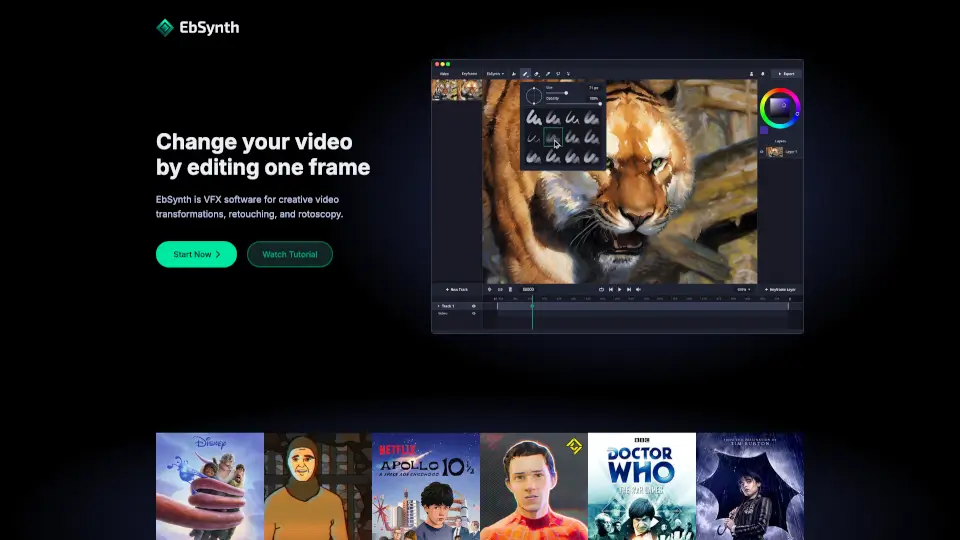
EbSynth is a powerful VFX software that lets you transform entire videos by editing just one frame. Whether you're an animator, filmmaker, or digital artist, EbSynth uses smart texture-synthesis—not AI—to automatically apply your hand-drawn style, color corrections, or visual effects across every frame of your video. This means you skip tedious manual tracking and focus on creativity.
Created by Šárka Sochorová and Ondřej Jamriška at Secret Weapons, EbSynth puts creative control in the hands of artists, enabling everything from hand-drawn animation to digital makeup with minimal effort. Just paint or edit keyframes, and EbSynth handles the rest—making it a true secret weapon for fast, high-quality video transformations.
What are the features of EbSynth?
- One-Frame Editing: Change your entire video by modifying a single keyframe—no frame-by-frame work needed.
- Non-AI Propagation: Uses a texture-synthesis algorithm (not generative AI) that relies only on your video and keyframes for accurate, artifact-free results.
- AI-Assisted Keyframe Generation: Optional "Generate Image" tool helps create starting keyframes using AI, which you can refine manually.
- Multi-Track Workflow: Isolate elements like eyes, face, or background on separate transparent layers for precise control.
- High-Quality Output: Free plan offers 720p MP4; Pro supports up to 4K export and PNG sequences.
- Offline Studio Option: The custom Studio plan runs entirely offline with command-line support and full data privacy.
- Free Tier Available: Full access to core features at $0—no watermarks or time limits.
What are the use cases of EbSynth?
- Turn live-action footage into hand-drawn animation by painting just a few key poses.
- Apply digital makeup or skin retouching across a whole video without manual rotoscoping.
- Colorize black-and-white videos quickly by coloring one representative frame.
- Create stylized music videos or experimental art by applying painterly effects consistently.
- Fix continuity errors or enhance lighting in specific scenes using localized keyframes.
- Animate character expressions (like blinking eyes) on a separate transparent track for realism.
- Rapidly prototype visual ideas during pre-production to test looks before full rendering.
How to use EbSynth?
- Start with one clear keyframe on a well-lit, high-texture frame—not mid-motion—to get the best propagation.
- Use soft, diffuse lighting and textured clothing in your source video to help optical flow tracking.
- If synthesis breaks in certain frames, add corrective keyframes only where needed instead of redrawing everything.
- For complex shots, split moving parts (face, body, background) into separate tracks with alpha-channel keyframes.
- When using AI-generated keyframes, paint over artifacts first, then re-run with lower AI strength for cleaner results.
- Always use Chrome on desktop for optimal performance, especially with HD or long videos.