
EbSynth logo

EbSynth

469
4.0
(0 Reviews)
United States37.89%

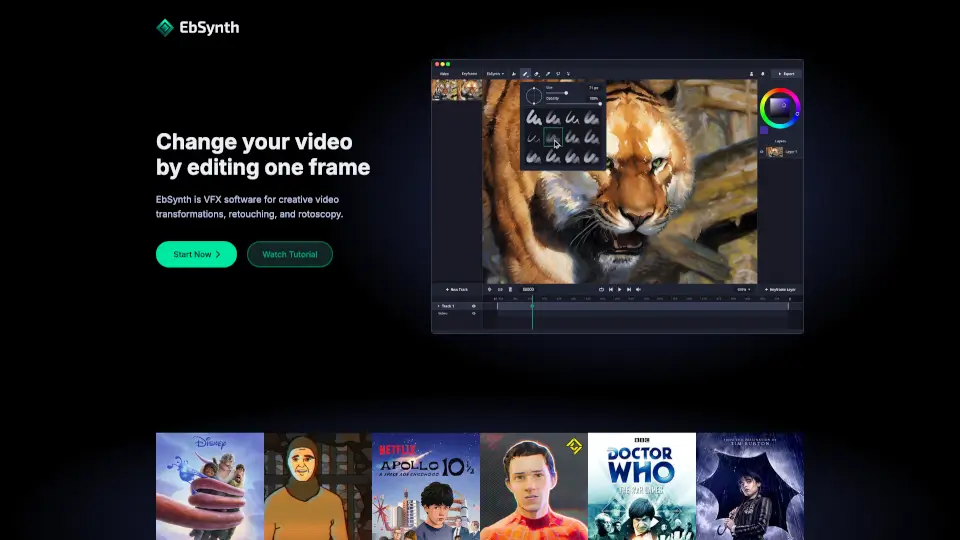
EbSynth transforms videos by letting you edit just one frame, using smart texture-synthesis for fast, artist-driven VFX without manual tracking.

Added on: 2025.03.13 · Updated on: 2026.06.04
Social Media:
EbSynth

EbSynth Product Information

What is EbSynth?

EbSynth is a powerful VFX software that lets you transform entire videos by editing just one frame. Whether you're an animator, filmmaker, or digital artist, EbSynth uses smart texture-synthesis—not AI—to automatically apply your hand-drawn style, color corrections, or visual effects across every frame of your video. This means you skip tedious manual tracking and focus on creativity.

Created by Šárka Sochorová and Ondřej Jamriška at Secret Weapons, EbSynth puts creative control in the hands of artists, enabling everything from hand-drawn animation to digital makeup with minimal effort. Just paint or edit keyframes, and EbSynth handles the rest—making it a true secret weapon for fast, high-quality video transformations.

What are the features of EbSynth?

  • One-Frame Editing: Change your entire video by modifying a single keyframe—no frame-by-frame work needed.
  • Non-AI Propagation: Uses a texture-synthesis algorithm (not generative AI) that relies only on your video and keyframes for accurate, artifact-free results.
  • AI-Assisted Keyframe Generation: Optional "Generate Image" tool helps create starting keyframes using AI, which you can refine manually.
  • Multi-Track Workflow: Isolate elements like eyes, face, or background on separate transparent layers for precise control.
  • High-Quality Output: Free plan offers 720p MP4; Pro supports up to 4K export and PNG sequences.
  • Offline Studio Option: The custom Studio plan runs entirely offline with command-line support and full data privacy.
  • Free Tier Available: Full access to core features at $0—no watermarks or time limits.

What are the use cases of EbSynth?

  • Turn live-action footage into hand-drawn animation by painting just a few key poses.
  • Apply digital makeup or skin retouching across a whole video without manual rotoscoping.
  • Colorize black-and-white videos quickly by coloring one representative frame.
  • Create stylized music videos or experimental art by applying painterly effects consistently.
  • Fix continuity errors or enhance lighting in specific scenes using localized keyframes.
  • Animate character expressions (like blinking eyes) on a separate transparent track for realism.
  • Rapidly prototype visual ideas during pre-production to test looks before full rendering.

How to use EbSynth?

  • Start with one clear keyframe on a well-lit, high-texture frame—not mid-motion—to get the best propagation.
  • Use soft, diffuse lighting and textured clothing in your source video to help optical flow tracking.
  • If synthesis breaks in certain frames, add corrective keyframes only where needed instead of redrawing everything.
  • For complex shots, split moving parts (face, body, background) into separate tracks with alpha-channel keyframes.
  • When using AI-generated keyframes, paint over artifacts first, then re-run with lower AI strength for cleaner results.
  • Always use Chrome on desktop for optimal performance, especially with HD or long videos.
EbSynth Contact Email:

[email protected]

Do you like this tool?

Upvote to help others discover it!

EbSynth Alternatives

Animate Old Photos

Animate Old Photos brings your cherished memories to life by transforming old, static photos into dynamic, 5-second videos using advanced AI technology.

DE
17.14%
|
88.4K
|
5.0
Animate Image AI

Animate Image AI turns photos into animated videos in seconds. Free, easy to use, and perfect for social media, marketing, or personal memories.

IT
20.72%
|
13.3K
|
4.0
SpicyGen

Turn your AI images into spicy, animated videos with ease. No subscription needed—just upload, describe, and generate. Perfect for social media, storytelling, or personal projects.

US
16.20%
|
485.3K
|
5.0
TensorPix

TensorPix makes video enhancement easy and free. Boost quality, fix flaws, and share sharper videos in seconds—no hassle.

US
23.46%
|
292.4K
|
5.0
Eddie AI

Eddie is an easy-to-use AI video editor that helps you quickly cut and refine videos from interviews or any footage. Export your work to popular formats and enjoy a smooth editing experience whether on desktop or web.

US
29.10%
|
80.4K
|
5.0
Nsketch AI

NSketch is your go-to AI video and image generator, transforming your ideas into professional, high-quality content in seconds, perfect for creators and brands.

US
20.12%
|
11.3K
|
4.0
AutoAE: Viral Hooks & YouTube Video Online Generator

AutoAE helps YouTubers create engaging animations quickly and easily, boosting video quality and viewer engagement.

IN
33.95%
|
303.3K
|
5.0
insMind AI Video Generator

insMind AI Video Generator lets you turn text and photos into cinematic, high-quality videos in seconds—no editing skills needed.

RU
15.92%
|
970.9K
|
5.0
EbSynth Related Other Categories

EbSynth Traffic Analysis

💡 Insights

🌱
Emerging Tool
10K-100K monthly visits. Niche or new tool with potential unique value.
📊
Steady Growth
Recent growth of 28%. Product is in a healthy upward trend.
👍
Good Experience
Bounce rate of 45%. Users are willing to explore features.
  • Monthly Visits

    47.06K

  • Bounce Rate

    45.13%

  • Pages Per Visit

    1.67

  • Visit Duration

    00:00:54

  • Global Rank

    751852

  • Country Rank

    459015

Visits Over Time

Traffic Sources

SearchOrganic37.62%
Direct37.06%
SocialOrganic16.00%
Referrals4.91%
GenAi3.91%
Mail0.49%
SearchPaid0.00%
SocialPaid0.00%
Affiliate0.00%

Top Keywords

1
ebsynth
CPC$2.08
7.80KTraffic
2
ebsynth download
370Traffic
3
eb synth
CPC$2.54
350Traffic
4
ebsinth
270Traffic
5
ebsynth prompts
190Traffic

Top Regions

RegionPercentage
United States
United States
37.89%
Brazil
Brazil
8.14%
India
India
7.45%
France
France
5.82%
Mexico
Mexico
4.87%
Low
High

EbSynth FAQ

Is EbSynth AI?

What browser should I use?

Do you store my projects?

Can I use EbSynth for free?

How do I cancel my subscription?

How do I get the best results?

EbSynth Reviews

0

0

0 Reviews
Sign Into leave a review

Recent Reviews

No reviews yet

EbSynth Embed

Use website badges to drive community support for SeekTool.ai. They are easy to embed in your homepage or footer.

Light
Dark
EbSynth - Featured on SeekTool.aiEbSynth - Featured on SeekTool.ai
How to install?

Looking for EbSynth Alternatives?

Compare top AI tools similar to EbSynth. Find the best option for your needs.

View Alternatives

Reviews

0.0

Share your experience with this tool...

Trending

Featured

Subscribe to our AI Newsletter

Get the top AI stories delivered to your inbox weekly.