
Was ist Voice Out?
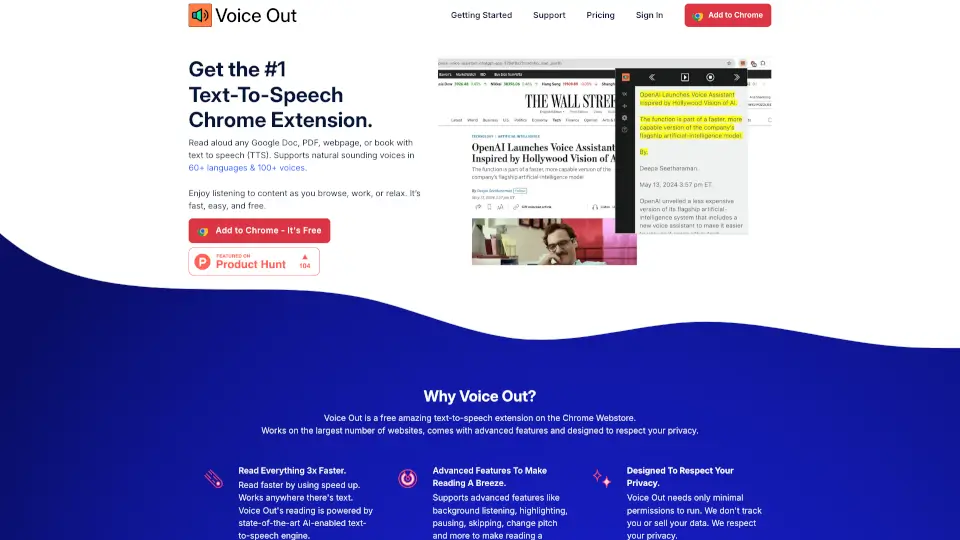
Voice Out ist die beste Text-to-Speech-Erweiterung für Chrome, mit der du jeden Text laut vorlesen lassen kannst – egal ob Google Docs, PDFs, Webseiten oder E-Books. Mit über 60 Sprachen und 100+ Stimmen macht es das Zuhören einfach und entspannt. Und das Beste? Es ist kostenlos!
Was sind die Merkmale von Voice Out?
- Überall nutzbar: Funktioniert auf Webseiten, Google Docs, PDFs und mehr.
- Natürliche Stimmen: KI-gestützte, natürlich klingende Stimmen in 100+ Varianten.
- Schneller lesen: Erhöhe die Geschwindigkeit, um Inhalte 3x schneller zu konsumieren.
- Datenschutzfreundlich: Kein Tracking, keine Datenweitergabe – deine Privatsphäre ist sicher.
- Praktische Steuerung: Einfache Bedienung mit Pause, Überspringen, Tonhöhen-Anpassung und mehr.
Was sind die Anwendungsfälle von Voice Out?
- Sprachen lernen: Verbessere dein Hörverständnis, während du mitliest.
- Barrierefreiheit: Perfekt für Menschen mit Leseschwäche oder Sehbehinderung.
- Multitasking: Lass dir Artikel vorlesen, während du andere Dinge erledigst.
- Korrekturlesen: Höre Fehler in Texten heraus, die du übersehen hast.
Wie benutzt man Voice Out?
- Öffne eine Webseite, PDF oder Google Doc.
- Klicke auf das Voice Out-Icon neben der Adressleiste.
- Genieße das Vorlesen – so einfach ist das!