
What is Theoasis?
Tired of staring at a blank screen, trying to find the perfect words? Meet OASIS—the smart writing assistant that turns your spoken thoughts into polished, professional text. Just talk naturally, and OASIS handles the heavy lifting: fixing grammar, refining tone, and formatting your message so it sounds like you at your best—even if you’re just thinking out loud.
Designed for macOS users who want to write faster and stress less, OASIS works right inside any app you use daily, from Notes and Messages to email clients and word processors. Whether you're drafting an essay, sending a quick work update, or brainstorming ideas, OASIS transforms your voice into clear, confident writing with zero effort on your part.
What are the features of Theoasis?
- Talk-to-Text Anywhere: Speak in any macOS app—OASIS captures your voice and converts it to editable text instantly.
- AI-Powered Rewriting: Don’t worry about sounding awkward; AI rewrites your speech into smooth, natural-sounding prose.
- Multiple Rewrite Options: Choose from 5 different style and format variations to match your tone—casual, professional, concise, and more.
- Edit Before Finalizing: Review and tweak your transcript before letting AI rewrite it, giving you full control.
- Language Support: Currently optimized for English speech recognition and rewriting.
- Free Trial Available: Test all core features with a no-commitment free trial before subscribing.
What are the use cases of Theoasis?
- Students dictating research notes or essay drafts without typing
- Professionals composing emails or Slack messages hands-free during busy workdays
- Writers capturing spontaneous ideas while walking or commuting (via Mac-connected devices)
- Non-native English speakers improving fluency and clarity in written communication
- Content creators drafting social media posts or blog outlines using voice
- Anyone who types slowly or prefers speaking their thoughts over manual writing
How to use Theoasis?
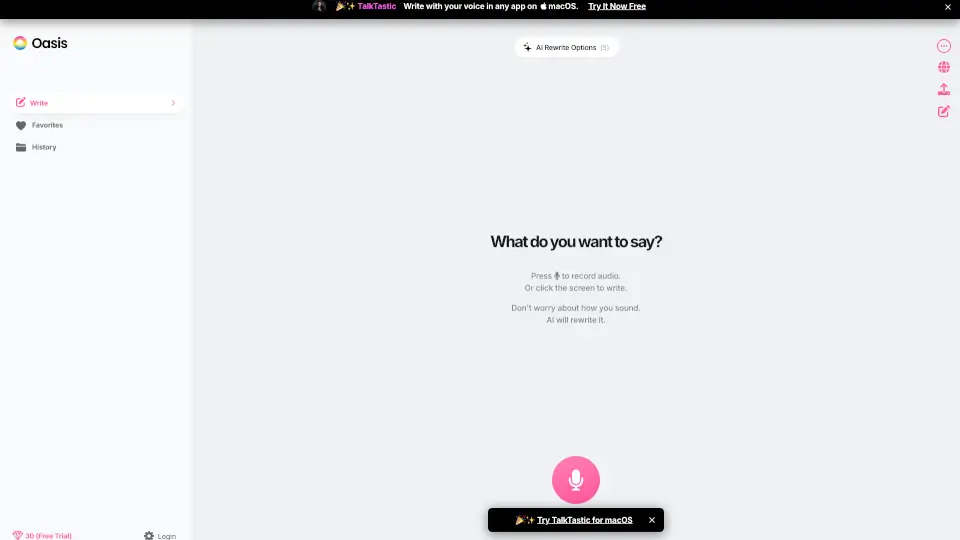
- Click the "Press to record audio" button (or tap the screen) to start speaking.
- Talk naturally—don’t stress over phrasing or grammar; OASIS will clean it up.
- After recording, choose to edit the transcript or let AI rewrite it immediately.
- Select from 5 rewrite styles to match your desired tone or purpose.
- Copy the final text or insert it directly into your active app.
- Save frequently used outputs to Favorites for quick access later.