
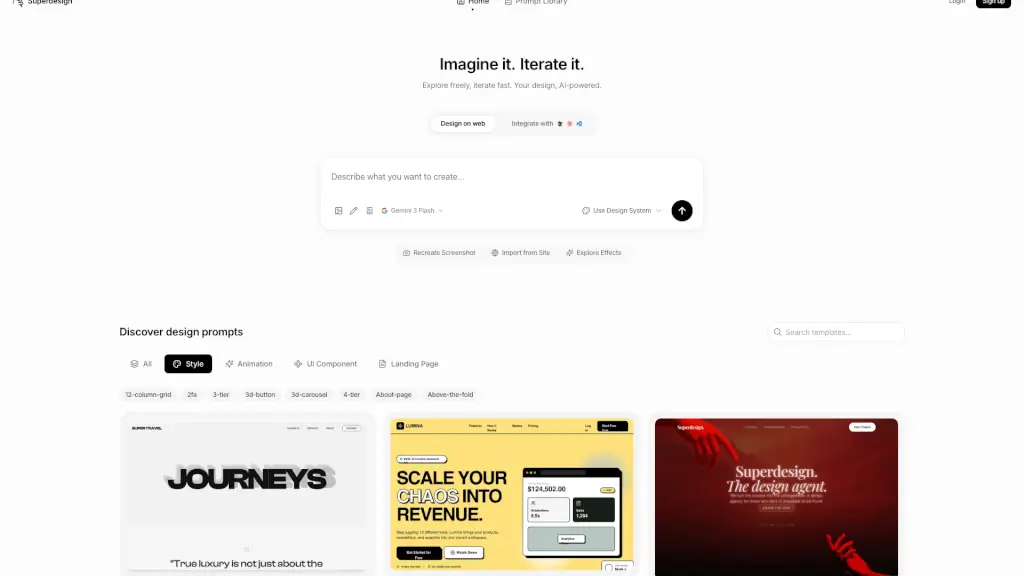
What is Superdesign?
Tired of spending hours wrestling with design tools just to get a basic interface looking good? Superdesign is your new secret weapon—an AI-powered design platform that turns your ideas into stunning, functional interfaces in seconds. Just describe what you want in plain English, and Superdesign generates beautiful UIs instantly, whether it’s a landing page, mobile app screen, or interactive component.
Built for designers, developers, and even non-technical creators, Superdesign combines smart AI (powered by Gemini 3 Flash) with intuitive controls so you can explore freely and iterate fast. No more starting from scratch or getting stuck in endless tweaking—Superdesign learns from your feedback and refines designs on the fly, all while keeping your brand consistent with built-in design system support.
What are the features of Superdesign?
- AI-Powered Design Generation: Describe your vision in natural language and get polished, ready-to-use interfaces instantly.
- Real-Time Iteration with Natural Language: Refine layouts, colors, or components by simply typing feedback like “make the button bolder” or “use a darker background.”
- Production-Ready Code Export: Get clean, responsive HTML, CSS, and JavaScript code you can drop straight into your project.
- Design System Integration: Maintain brand consistency by connecting your own design tokens or using Superdesign’s built-in system.
- Screenshot Recreation: Upload a screenshot of any website or app, and Superdesign rebuilds it as an editable, code-ready design.
- Website Import Tool: Pull live site elements directly into your workspace for fast redesigns or inspiration.
- Prompt Library & Effects Explorer: Browse hundreds of pre-built prompts and visual effects to spark creativity or speed up workflows.
- Web-Based Platform: Work anywhere—no downloads, no complex setup. Everything runs smoothly in your browser.
What are the use cases of Superdesign?
- A startup founder quickly prototypes a landing page for investor pitches without hiring a designer.
- A freelance developer builds client-ready UI mockups in minutes, then exports clean code to accelerate delivery.
- A product team experiments with multiple UI component variations during a sprint planning session using natural language prompts.
- A marketer recreates a competitor’s high-converting page (ethically!) to test new messaging and layout ideas.
- A student learning web design practices real-world interface creation with instant AI feedback and guidance.
- A UX researcher generates diverse interface options to test user preferences during usability studies.
How to use Superdesign?
- Sign up for a free account at Superdesign’s website—no credit card needed to start.
- Choose a starting point: use a prompt from the Prompt Library, describe your idea from scratch, or import a screenshot/site.
- Refine your design by typing simple instructions like “add a contact form” or “switch to dark mode.”
- Apply or customize animations and visual effects using the Explore Effects panel.
- Sync your brand’s colors, fonts, and spacing via the Design System settings for consistency.
- When satisfied, click Export Code to download production-ready frontend code.