
What is Stable Diffusion Web?
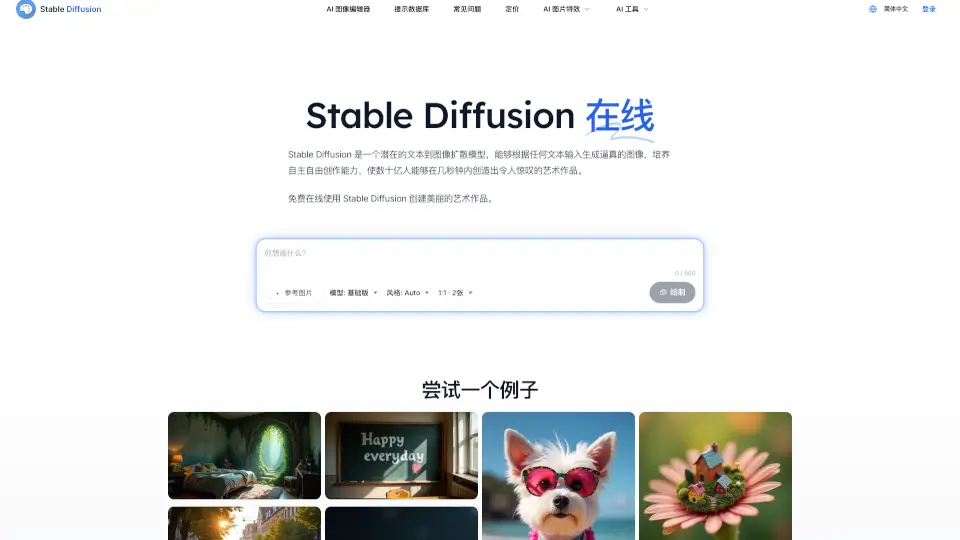
Stable Diffusion Online is a free, user-friendly web platform that lets anyone turn simple text prompts into stunning AI-generated images—no technical skills or software installation required. Powered by the advanced Stable Diffusion XL (SDXL) model, it delivers high-quality, photorealistic or artistic visuals in seconds right from your browser.
Whether you're an artist, designer, student, or just curious about AI creativity, this tool empowers you to bring your imagination to life instantly. With privacy-first design and zero cost, Stable Diffusion Online makes cutting-edge generative AI accessible to everyone.
What are the features of Stable Diffusion Web?
- Free Online Access: Use Stable Diffusion XL directly in your browser—no downloads, sign-ups, or payments needed.
- High-Quality Image Generation: Create detailed, vibrant images using the latest SDXL model with enhanced resolution and realism.
- Privacy-Focused: All generations are anonymous; the site doesn’t store your prompts or images.
- Fast GPU-Powered Processing: Leverages cloud GPUs for quick results—often in under 10 seconds.
- Prompt Database: Explore over 9 million community-tested prompts to inspire or refine your creations.
- Multiple Output Options: Generate 1:1 square images (or other ratios) with support for up to 2 images per prompt.
- CC0 Public Domain License: All generated images are yours to use freely—even commercially—under CC0 1.0.
What are the use cases of Stable Diffusion Web?
- Concept artists generating mood boards or character designs
- Social media creators making eye-catching posts without stock photos
- Educators illustrating abstract ideas (e.g., “underwater owl” or “fractal creature”) for classroom use
- Writers visualizing scenes from stories or novels
- Marketers prototyping ad visuals or product mockups
- Hobbyists experimenting with AI art styles like vaporwave, pixel art, or oil painting
- Students creating visuals for presentations or projects
How to use Stable Diffusion Web?
- Visit stablediffusionweb.com in any modern browser.
- Type a clear, descriptive text prompt (e.g., “Mystical jungle cenote at sunset, vibrant greens and blues, cinematic lighting”).
- Choose your preferred aspect ratio (default is 1:1) and number of images (up to 2).
- Click “Draw” and wait a few seconds for your AI-generated image(s) to appear.
- Use the built-in Prompt Database if you need inspiration or want to refine your wording.
- Download your results and use them anywhere—personal or commercial projects included!