
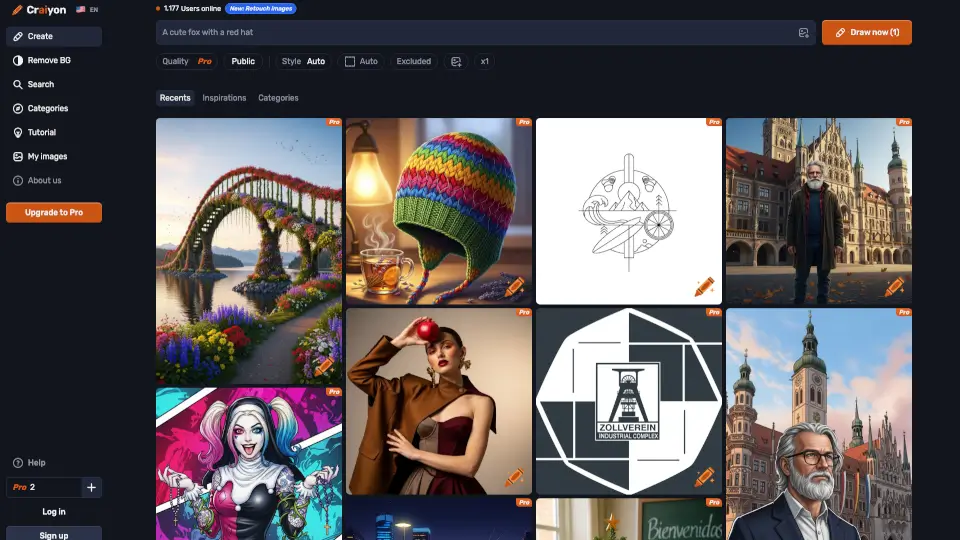
O que é Craiyon?
O Craiyon é um gerador gratuito de imagens com IA que transforma suas ideias em arte visual em segundos. Basta digitar uma descrição em texto — como “gato astronauta em Marte, estilo anime” — e o sistema gera imagens únicas com base no seu prompt. Ideal tanto para curiosos quanto para criadores profissionais, o Craiyon oferece acesso imediato sem necessidade de instalação ou cartão de crédito.
Antes conhecido como DALL·E mini, o Craiyon evoluiu para uma plataforma mais robusta, com controles avançados, múltiplos estilos artísticos e ferramentas de edição. Mesmo na versão gratuita, você pode explorar sua criatividade, gerar referências visuais ou criar conteúdo para redes sociais — tudo direto do navegador.
Quais são as características de Craiyon?
- Geração gratuita de imagens por texto: Crie arte a partir de descrições escritas, sem custo inicial.
- Seis estilos visuais: Escolha entre Photo, Artistic, Anime, Illustration, Vector e Raw para adaptar o resultado ao seu projeto.
- Campo "Excluir": Evite elementos indesejados (como texto, pessoas ou cores específicas) para resultados mais precisos.
- Controle de proporção: Gere imagens em formato quadrado, retrato ou paisagem conforme sua necessidade.
- Busca de inspirações: Explore milhões de criações da comunidade e veja os prompts usados por outros usuários.
- Edição avançada (com créditos): Refine imagens existentes com modelos de alta qualidade (disponível para assinantes).
- Suporte multilíngue: Funciona com prompts em português, inglês e outros idiomas.
Quais são os casos de uso de Craiyon?
- Criar arte conceitual para jogos ou histórias em quadrinhos
- Gerar imagens para posts em redes sociais sem precisar de fotógrafo
- Produzir referências visuais para designers de interiores ou tatuagens
- Fazer pôsteres personalizados ou capas de álbuns musicais
- Desenvolver protótipos rápidos para projetos escolares ou apresentações
- Explorar ideias criativas sem habilidades artísticas tradicionais
Como usar Craiyon?
- Digite um prompt detalhado (ex: “cachorro golden retriever correndo em folhas de outono, estilo fotográfico”)
- Selecione o estilo desejado (Photo, Anime, Vector etc.) e a proporção da imagem
- Use o campo “Excluir” para remover elementos indesejados (ex: “sem texto”, “sem pessoas”)
- Clique em “DRAW” e aguarde a geração das imagens
- Clique em qualquer resultado para ver o prompt original ou encontrar imagens similares
- Faça ajustes no texto e gere novamente até obter o resultado ideal