
What is Nimbalyst?
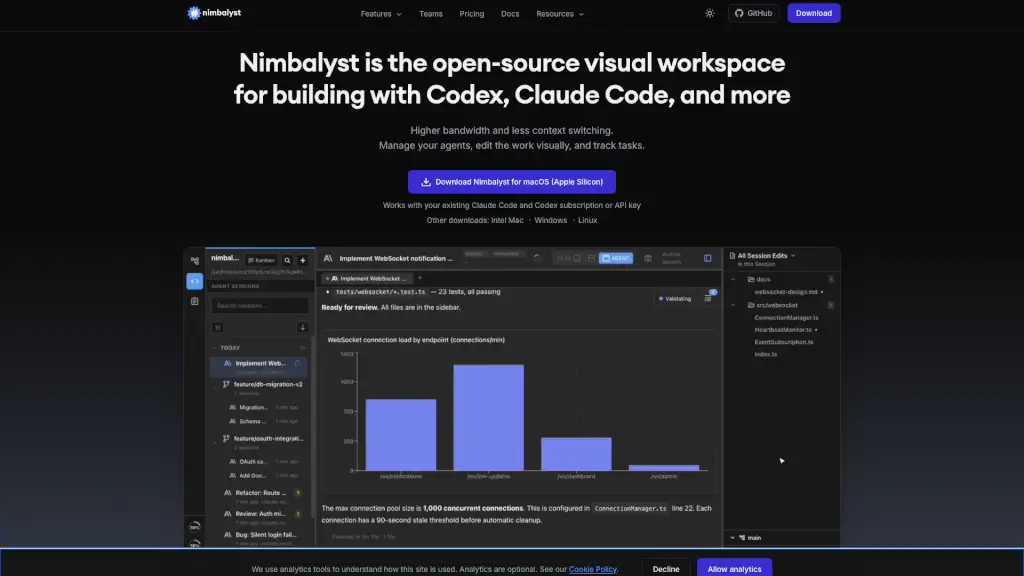
Nimbalyst is an open-source visual workspace designed to make working with AI coding agents like Claude Code and Codex smoother and more visual. Instead of typing commands in a terminal, you get a full desktop app where you can edit markdown, mockups, diagrams, code, spreadsheets, and even mind maps — all while your AI agent works alongside you. It's free for individuals, MIT-licensed, and lets you review every AI change before it lands in your files.
What are the features of Nimbalyst?
- Visual Editors for Everything: Edit markdown, mockups, code, CSVs, Mermaid diagrams, Excalidraw drawings, data models, and more — all in one app.
- Parallel Agent Sessions: Run multiple Claude Code or Codex sessions at the same time, each optionally isolated in its own git worktree.
- Inline Diff Review: See every file change your agent makes as a diff, approve or reject edits right there, and iterate without switching tools.
- Session Kanban Board: Organize your agent sessions by status (backlog, planning, implementing, review) to keep track of everything.
- Integrated Task Management: Tasks live in the same workspace — agents can read your backlog and update tasks automatically as they work.
- Real-Time Collaboration: Share documents, mockups, and task boards with your team; each person's agent works on the same shared files.
- Open Source & Extensible: MIT-licensed desktop and iOS apps. Build your own editors or install community extensions from the marketplace.
What are the use cases of Nimbalyst?
- Review AI Code Changes: Let Claude Code rewrite a function, then inspect the diff side by side in a proper code editor — no terminal magic.
- Design Wireframes with AI: Create a mockup visually, then ask your agent to generate matching frontend code from it.
- Edit Markdown with AI Help: Write docs while your agent handles formatting, adds links, or restructures content — all in the same visual editor.
- Model Data Schemas: Describe your data needs, and let Codex generate a full relational schema as a diagram, ready to export as Prisma.
- Manage Multiple Agent Workflows: Run six or more agent sessions in parallel (e.g., one for refactoring, one for testing, one for docs) and track progress on a kanban board.
- Collaborate on Tasks with Team: Share a task board where agents and humans both update status, so everyone stays in sync without extra tooling.
How to use Nimbalyst?
- Download Nimbalyst: Grab the macOS (Apple Silicon) version from the website — or choose Intel, Windows, or Linux.
- Connect Your AI Agent: Use your existing Claude Code or Codex subscription or API key. No extra signup needed.
- Open a Visual Editor: Click on any .md, .csv, .excalidraw, or code file to start editing visually with your agent active.
- Start a Session: Type a natural-language instruction in the agent window (e.g., "Refactor this function to use async/await").
- Review & Approve: Every AI edit appears as a diff. Accept or reject each change, or ask the agent to tweak further.
- Organize with Kanban: Drag sessions between columns (Planning → Implementing → Review) to track progress across parallel work.