
What is Morgen?
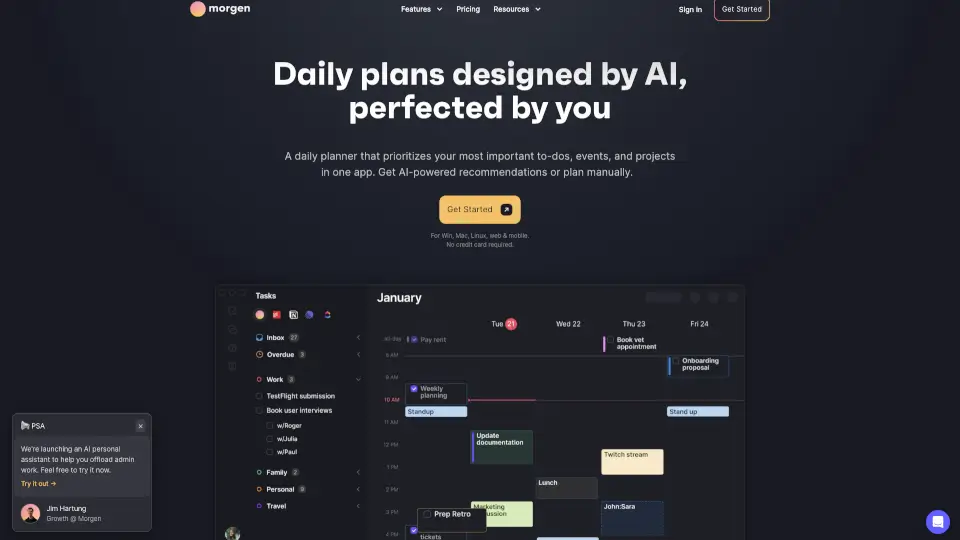
Morgen is an AI-powered daily planner that brings all your calendars and tasks together in one place. Instead of jumping between Google Calendar, Outlook, Todoist, and Notion, you get a single view of your day. The AI helps you prioritize what matters, protect focus time, and automatically adjust your schedule when things change. It's built for people who want to feel in control of their time without the mental overhead of manual planning.
What are the features of Morgen?
- AI Planner: Gets live recommendations for how to structure your day. It adapts in real-time when you move tasks or adjust durations.
- Calendar Consolidation: Combine calendars from Google, Outlook, Apple, Fastmail, and more. View them together or in custom subsets called Calendar Sets.
- Task Integrations: Pull tasks from Notion, ClickUp, Linear, Todoist, and other tools directly into your calendar for time blocking.
- Auto-Schedule & Frames: Template your ideal week with Frames, then let the AI fill in the details. Preview, adjust, and confirm.
- Smart Reminders: Get reminded of uncompleted tasks from previous days so nothing falls through the cracks.
- Built-in Scheduling Links: Share personalized booking links that check your real-time availability across selected calendars.
- Calendar Automations: Automatically add travel time, buffer time between meetings, and sync events between calendars.
- Team Availability: View colleagues' availability and find meeting times that respect their focus time.
What are the use cases of Morgen?
- A busy professional managing work and personal calendars across Google and Outlook, needing one unified view to avoid double-booking.
- A project manager time blocking tasks from Notion and Linear, using AI Planner to fit everything into a realistic schedule.
- A remote worker who wants to protect deep focus time by scheduling uninterrupted blocks and automatically adding buffer between meetings.
- A freelancer using scheduling links to let clients book time, with availability checked in real-time against all their calendars.
- A student juggling classes, study sessions, and part-time work, using Morgen to see everything in one place and never miss a deadline.
How to use Morgen?
- Connect your calendars (Google, Outlook, Apple, Fastmail) and task tools (Notion, Todoist, ClickUp, Linear) in Settings.
- Use Frames to template your ideal week—set recurring blocks for deep work, meetings, and breaks.
- Let the AI Planner preview a daily schedule. Review the recommendations and drag tasks to adjust timing or duration.
- Confirm the plan to schedule tasks into your calendar as protected time blocks.
- Use Calendar Sets to toggle between different views—work only, personal only, or everything together.
- Set reminders on events and scheduled tasks, and enable automations for travel time and buffer.