
What is Linear?
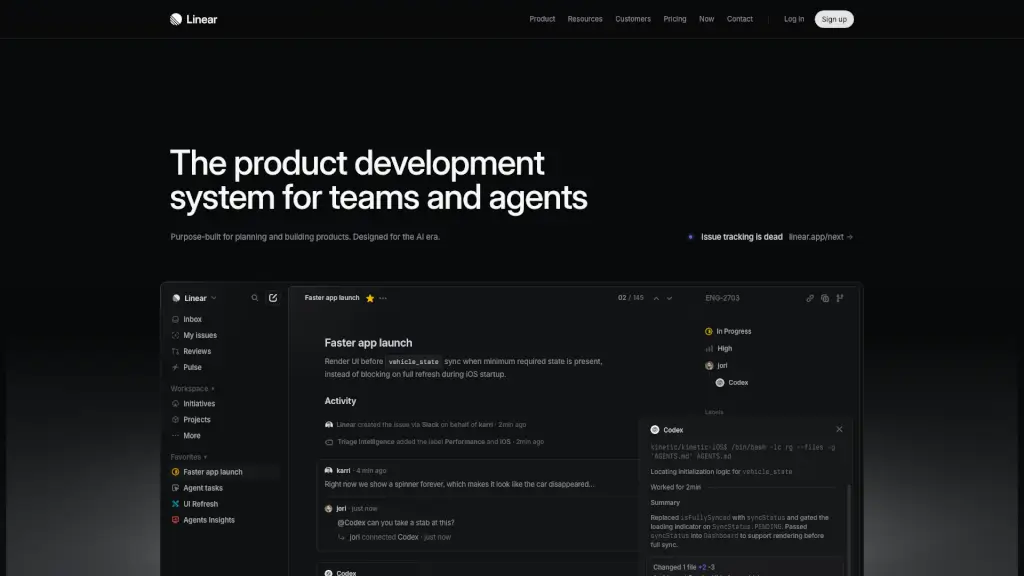
Linear is a modern product development system built specifically for teams that want to plan and build software faster—especially in the AI era. Unlike traditional project management tools cluttered with noise, Linear cuts through the chaos with a clean, fast interface designed around how top product teams actually work. It blends human collaboration with AI agents that can draft specs, create issues, and even push code changes.
What sets Linear apart is its focus on speed, clarity, and AI-native workflows. Whether you're triaging customer feedback, managing sprints, or shipping features across iOS and Android, Linear helps your team stay focused and move with momentum. From startups to enterprises like OpenAI and Ramp, thousands of teams rely on Linear to turn ideas into shipped products—without the usual friction.
What are the features of Linear?
- AI Agents Built In: GitHub Copilot, Codex, and other AI agents work directly inside Linear to automate tasks like issue creation, PR drafting, and bug fixes.
- Purpose-Built for Product Teams: Designed with workflows shaped by world-class engineering and product practices—not generic templates.
- Real-Time Collaboration: Seamlessly sync conversations from Slack or Microsoft Teams into actionable, labeled, and prioritized issues.
- Visual Planning Tools: Use cycles, roadmaps, and initiatives to align your team from idea to launch with clear timelines and ownership.
- Smart Issue Tracking: Automatically routes feedback, applies labels (like “Performance” or “iOS”), and surfaces what needs attention next.
- Integrated Code Review: View structural diffs, discuss changes, and merge pull requests—all within Linear’s streamlined interface.
- Performance-Focused UI: Reduces loading delays and UI flicker by rendering critical screens before full data sync (e.g., showing the app before waiting for full vehicle state).
- Cross-Platform Support: Optimized for mobile apps (iOS/Android), web, and integrations with GitHub, Playwright, and MCP servers.
What are the use cases of Linear?
- A mobile team fixes slow iOS startup by rendering the UI as soon as minimal vehicle data is available—instead of showing a spinner forever.
- Customer support messages in Slack automatically become triaged Linear issues with labels, assignees, and priority based on content.
- Product managers use AI agents to draft PRDs, break them into tasks, and assign them to engineers across multiple projects.
- Engineering leads monitor cycle times and agent performance through dashboards to spot bottlenecks before deadlines slip.
- Design and engineering collaborate on a “UI Refresh” initiative with shared documents, real-time updates, and progress tracking.
- Teams preparing for a Japan launch manage localization, feature rollouts, and risk alerts all in one visual timeline.
How to use Linear?
- Sign up and connect your tools: Link GitHub, Slack, or Microsoft Teams so conversations flow into Linear as structured work.
- Use AI agents from the command menu: Type “@GitHub Copilot” in an issue to delegate coding tasks or request PR drafts.
- Organize work with Cycles: Plan 1–2 week sprints using Linear’s time-boxed cycles instead of endless backlogs.
- Label issues intelligently: Let Triage Intelligence auto-tag issues (e.g., “Performance,” “iOS”) based on content and context.
- Review code without leaving Linear: Use built-in diffs to inspect changes from both humans and AI agents side by side.
- Track progress with Pulse: Get weekly updates on project health, risks, and completion status across all initiatives.