
What is iFoto?
Tired of spending hours editing product photos or struggling to show off your fashion items online? Meet iFoto AI Photo Studio—a free, all-in-one online editor powered by smart AI tools designed specifically for e-commerce creators, small businesses, and everyday users. Whether you’re running an online store, updating your social media, or just want to make your photos pop, iFoto makes professional-quality editing fast, easy, and totally free.
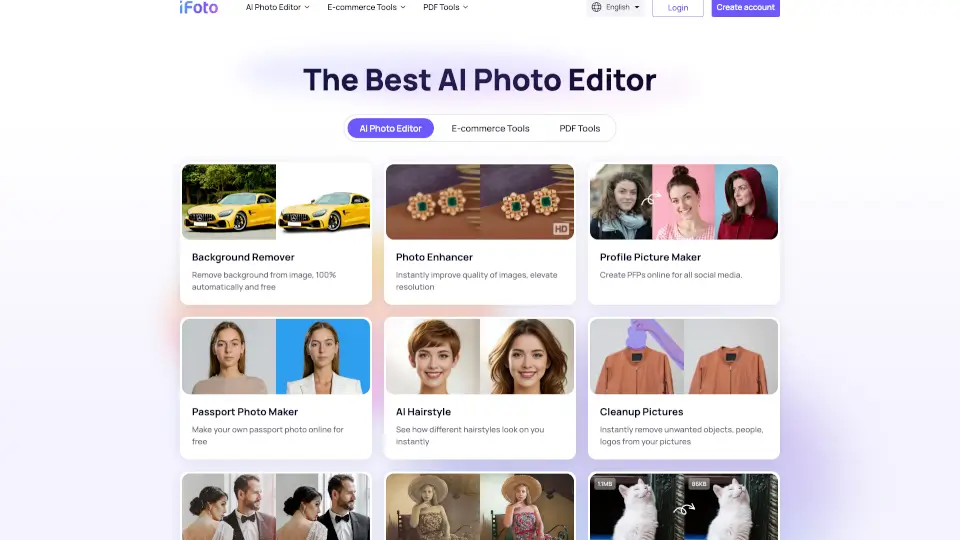
With iFoto, you can remove backgrounds in one click, enhance blurry images, generate realistic AI fashion models, recolor clothing, and even restore old family photos—all from your browser. No downloads, no watermarks, and no design skills needed. Trusted by over 70 million creators, it’s the go-to magic studio for anyone who wants stunning visuals without the hassle.
What are the features of iFoto?
- AI Background Remover: Instantly strip any background with 100% automatic precision—perfect for clean product shots.
- AI Clothes Changer: Visualize outfits on real or AI-generated models without photoshoots; ideal for fashion retailers.
- Photo Enhancer: Boost resolution, brightness, and clarity to make dull images look sharp and professional.
- AI Fashion Models: Generate diverse, lifelike models wearing your clothing—great for inclusive, scalable product displays.
- Clothing Recolor Tool: Test different colors on garments instantly to see what sells best.
- Old Photo Restoration & Colorization: Bring faded or black-and-white memories back to life in vivid color.
- Free Image Compressor: Reduce file size without losing quality—speed up your website or social uploads.
- Online Background Changer: Swap plain backgrounds for stylish scenes or branded settings in seconds.
What are the use cases of iFoto?
- An online boutique owner creates model photos for new dresses using AI Fashion Models—no hiring photographers or models.
- A reseller removes messy home backgrounds from product photos using the Background Remover for cleaner listings.
- A traveler makes a passport photo at home with the Passport Photo Maker, saving a trip to the post office.
- A vintage shop restores and colorizes 1950s black-and-white photos to showcase restored furniture or apparel.
- A social media influencer designs eye-catching profile pictures (PFPs) that stand out across platforms.
- A Shopify store uses Image Optimizer to compress product images, improving page load speed and SEO.
- A student cleans up a group photo by removing unwanted people or logos with the Cleanup Pictures tool.
How to use iFoto?
- Go to iFoto.ai and click Create account (or use as a guest for basic features).
- Upload your image—whether it’s a product shot, selfie, or old photo.
- Choose a tool like Background Remover, AI Clothes Changer, or Photo Enhancer from the dashboard.
- Let the AI process your image automatically—most edits take under 10 seconds.
- Preview your result, make minor tweaks if needed, then download in high quality.
- For e-commerce, use AI Fashion Models or Clothing Recolor to create multiple product variants fast.