
What is AudioNotes?
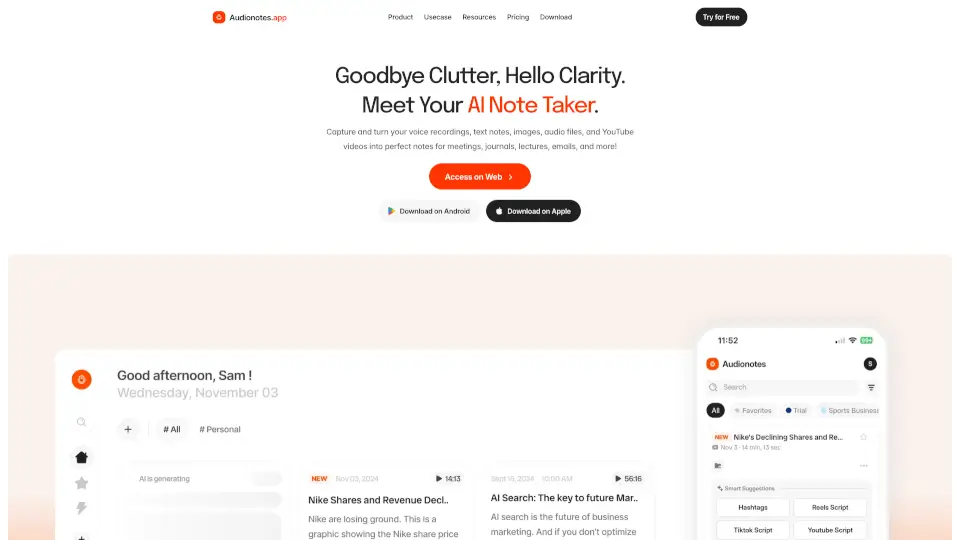
Tired of messy voice memos, scattered meeting recordings, or hours spent turning lectures into notes? Audionotes is your AI-powered note-taking assistant that transforms voice, audio, video, text, images, and even YouTube links into clean, structured, and searchable notes—fast. Whether you're a student, professional, creator, or just someone who thinks out loud, Audionotes captures your ideas exactly as they come and organizes them so you don’t have to.
Available on iOS, Android, Web, and Mac (beta), Audionotes works across all your devices with seamless sync. With support for 99+ languages, speaker recognition, and 95% transcription accuracy, it’s designed to keep up with real life—whether you’re in a noisy café, a quiet lecture hall, or brainstorming in the shower.
What are the features of AudioNotes?
- Multi-Source Input: Record voice, upload audio/video files, paste YouTube links, snap images, or type text—all converted into smart notes.
- AI Summarization & Custom Outputs: Get meeting minutes, journal entries, flashcards, emails, or blog outlines using 100+ built-in prompts or your own.
- Chat with Your Notes: Ask questions directly about your content and get instant, context-aware answers from your transcribed material.
- 99+ Language Support: Auto-detects or lets you choose your language for transcription and translation.
- Speaker Recognition: Automatically identifies and labels different speakers in conversations.
- Secure & Private by Design: Your data is encrypted, never used to train AI models, and never shared with third parties.
- Powerful Integrations: Connect to WhatsApp (via bot), Notion, Zapier, and webhooks for automated workflows.
- Cross-Platform Sync: Access and organize notes anywhere—phone, tablet, or desktop—with folders, tags, search, and export options.
What are the use cases of AudioNotes?
- Turn team meetings into clear summaries with action items and decisions highlighted.
- Convert college lectures or YouTube tutorials into study-ready notes, quizzes, or flashcards.
- Capture daily journal entries or personal reflections by speaking naturally—no typing needed.
- Create medical SOAP notes or patient documentation quickly from voice recordings.
- Draft professional emails, LinkedIn posts, or TikTok scripts from spoken ideas.
- Organize legal client meetings into structured case notes or follow-ups.
- Support ADHD brain dumps by transforming chaotic thoughts into actionable tasks and ideas.
- Transcribe old conference recordings or interviews stored on your phone into usable text.
How to use AudioNotes?
- Tap “Record” to capture a voice note—or upload an audio/video file, image, or YouTube link.
- Let Audionotes auto-transcribe your content in your preferred language (99+ supported).
- Choose a template (e.g., “Meeting Summary,” “Journal Entry,” or “Blog Outline”) or use a custom prompt.
- Use the “Chat” feature to ask questions like “What were the key decisions?” or “List action items.”
- Organize notes with folders, tags, or bookmarks, then search instantly across everything.
- Share or publish notes via email, WhatsApp, Slack, LinkedIn, or a public page—or sync to Notion.