
What is Kits AI?
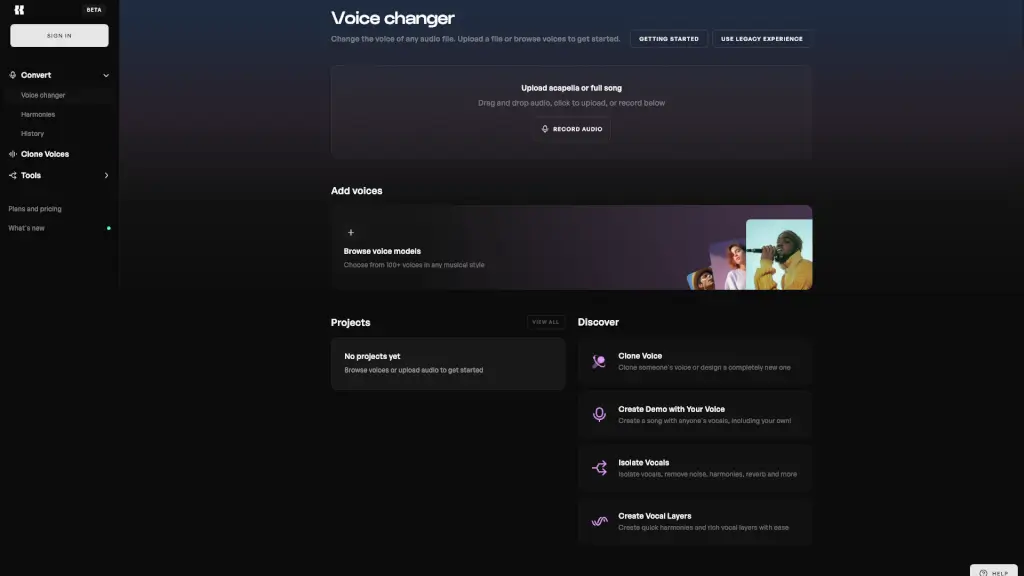
Kits.AI Voice Studio is your all-in-one browser-based tool for transforming any voice into something completely new—no downloads or complex software needed. Whether you're a musician, content creator, or just experimenting with sound, you can instantly change your voice or someone else’s using high-quality AI voice models. Just upload an audio file, pick a voice, and let the magic happen.
What makes Kits.AI stand out is its focus on music creators: it offers royalty-free AI voices modeled after real artists and instruments, so you can generate vocals that actually work in songs—not just robotic gimmicks. Plus, with tools like vocal isolation, harmony generation, and voice cloning, it’s built to fit seamlessly into your creative workflow from demo to final mix.
What are the features of Kits AI?
- AI Voice Changer: Transform any uploaded vocal into 100+ different AI-generated voices across genres—perfect for music production.
- Royalty-Free Artist Voices: Use AI models inspired by real musical styles without worrying about licensing or copyright issues.
- Vocal Isolation: Cleanly separate vocals from full tracks, removing background noise, reverb, and instrumentals.
- Harmony & Vocal Layering: Instantly create rich backing vocals and harmonies with just a few clicks.
- Voice Cloning: Clone your own voice or design a brand-new one to use in future projects.
- In-Browser Workflow: Everything runs directly in your browser—no installs, no waiting, just drag, drop, and create.
What are the use cases of Kits AI?
- Musicians creating demo tracks with AI vocals before recording live singers
- Producers experimenting with different vocal styles without hiring session vocalists
- Content creators changing their voice for YouTube intros, podcasts, or social media clips
- Songwriters testing melodies using realistic AI-sung vocals
- Beatmakers adding instant vocal layers or harmonies to instrumentals
- Indie artists building full songs using only their own cloned voice in multiple parts
How to use Kits AI?
- Upload an acapella or full song via drag-and-drop, file selection, or in-browser recording
- Browse the library of 100+ AI voice models and select one that fits your musical style
- Apply vocal processing like harmonies, noise removal, or reverb reduction as needed
- Preview your transformed audio and download the final result when satisfied
- Save your project to revisit or remix later (if logged in)
- Use the “Clone Voice” feature to create a custom model from your own recordings