
What is Obsidian?
Obsidian is a free, privacy-first note-taking app that turns your thoughts into a connected web of ideas. Unlike cloud-based tools that lock you in or scan your data, Obsidian stores everything as plain text Markdown files on your own device, giving you full control and offline access anytime.
Built for thinkers, writers, students, and creators, Obsidian helps you sharpen your thinking by linking notes, visualizing connections, and building a personal knowledge base that grows with you. With thousands of community plugins and themes, it adapts to your brain—not the other way around.
What are the features of Obsidian?
- Local-First Privacy: Your notes stay on your device—never uploaded unless you choose to sync. Not even Obsidian can read them.
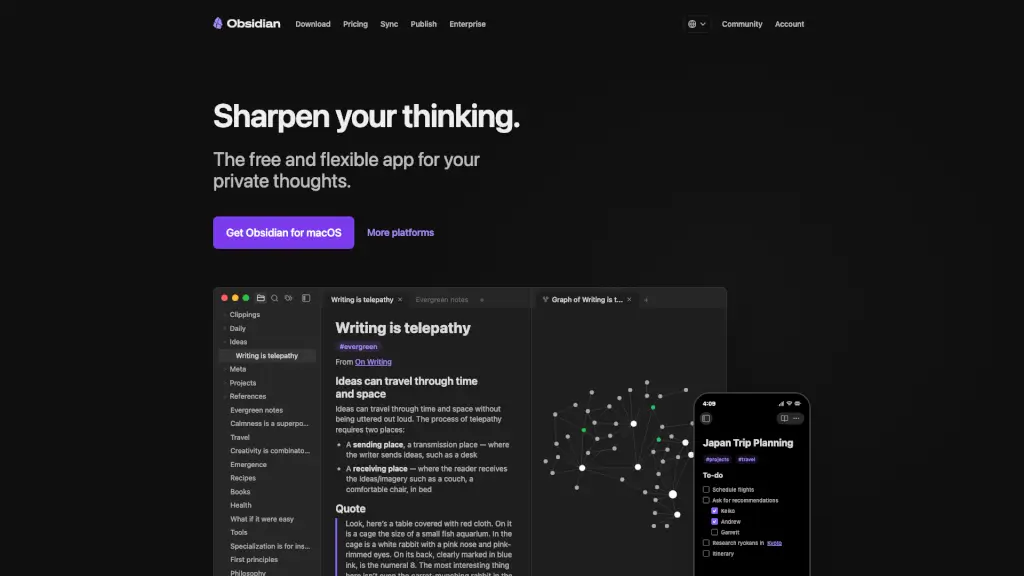
- Bi-Directional Linking: Connect ideas across notes to build a personal Wikipedia that reveals hidden relationships.
- Interactive Graph View: See your knowledge as a living map, uncovering patterns in how you think.
- Canvas: A freeform infinite workspace for brainstorming, diagramming, and laying out complex projects visually.
- Extensible via Plugins: Customize your workflow with powerful community tools like Tasks, Dataview, Kanban, and Calendar.
- Open File Format: Notes are saved as standard Markdown (.md) files—yours forever, no vendor lock-in.
- Obsidian Sync: Optional end-to-end encrypted syncing across devices with selective file control and version history.
- Publish to Web: Instantly turn notes into a public digital garden, wiki, or documentation site with SEO-friendly pages.
What are the use cases of Obsidian?
- Building a personal knowledge management system (Zettelkasten or evergreen notes)
- Managing creative writing projects with character, plot, and world-building notes
- Organizing academic research with linked sources, quotes, and analysis
- Running daily journaling or habit tracking with backlinked reflections
- Planning complex trips or events (like a Japan itinerary) with checklists and references
- Creating team documentation via shared vaults while keeping personal notes private
- Developing a digital garden of evolving ideas published online
How to use Obsidian?
- Download Obsidian for Windows, Mac, Linux, iOS, or Android and create a new "vault" (your notebook folder).
- Write notes in Markdown—use
[[double brackets]]to link to other notes instantly. - Click the Graph icon to explore visual connections between your ideas.
- Install useful plugins like Tasks or Dataview from Settings > Community Plugins to supercharge organization.
- Enable Obsidian Sync (paid) if you want encrypted cross-device access with version history.
- Use Canvas for mind maps, project boards, or visual note layouts beyond linear writing.