
What is URLtoText?
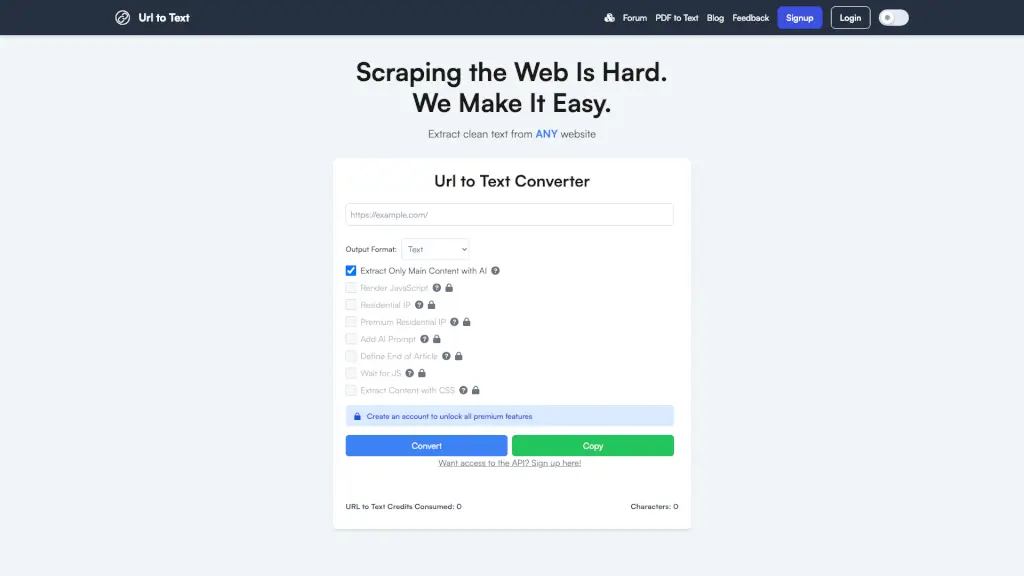
URL to Text is a powerful tool designed to help you extract clean, readable text from any website. Whether you're a student, a professional, or just someone who needs to quickly get the main content from a webpage, this tool makes it easy and efficient. With options like JavaScript rendering, AI-powered content extraction, and the ability to use residential IPs, URL to Text ensures that you get the most accurate and relevant information every time.
What are the features of URLtoText?
- Extract Clean Text: Quickly convert any webpage into plain text or markdown format.
- AI-Powered Content Extraction: Use advanced AI to extract only the main, relevant content on the page.
- JavaScript Rendering: Render JavaScript on the page before converting to ensure all dynamic content is captured.
- Residential IP Usage: Use a residential IP address to bypass certain restrictions and access more content.
- Custom CSS Selector: Specify a CSS selector to extract specific parts of the webpage.
- Wait for JS Load: Wait for JavaScript to fully load on the page before fetching content, ensuring all dynamic elements are included.
- Add AI Prompt: Add an AI-generated prompt for custom extraction, making it even more tailored to your needs.
What are the use cases of URLtoText?
- Research and Summarization: Quickly extract key points from articles, research papers, and other web content.
- Content Curation: Gather and curate content from multiple sources for newsletters, blogs, or social media.
- SEO Analysis: Analyze the text content of websites for SEO purposes, such as keyword density and content quality.
- Data Collection: Collect data from web pages for market research, competitive analysis, or academic studies.
- Accessibility: Convert web content into a more accessible format for users with visual impairments or those who prefer reading in plain text.
- Social Media Monitoring: Monitor and extract text from social media posts and mentions for brand management.
How to use URLtoText?
- Enter the URL of the webpage you want to extract text from in the provided input box.
- Choose your desired output format (Text, Markdown, or HTML).
- Select additional options like JavaScript rendering, AI-powered content extraction, and residential IP usage.
- Click the "Convert" button and wait for the tool to process the request.
- Once the conversion is complete, click "Copy" to copy the extracted text to your clipboard.