What is Noteey?
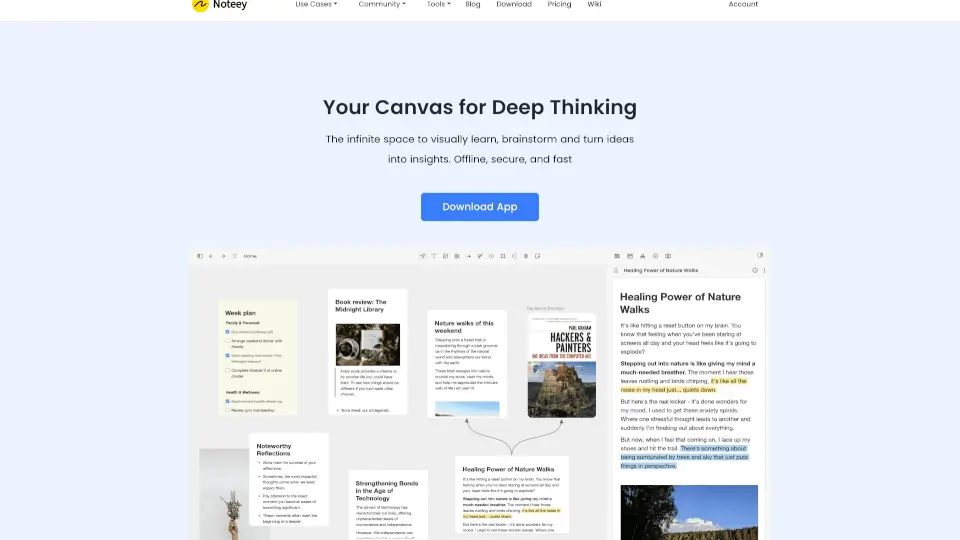
Noteey is your go-to visual note-taking app designed to help you organize ideas, create content, and manage knowledge visually. With an infinite canvas, AI tools, and offline access, Noteey makes it easy to turn thoughts into actionable insights. Whether you're researching, brainstorming, or presenting, Noteey is here to supercharge your productivity.
What are the features of Noteey?
- Infinite Canvas: Create and organize ideas on an unlimited, flexible space.
- AI Tools: Summarize videos, PDFs, and documents with AI-powered tools.
- Offline First: Access your notes anytime, even without internet.
- PDF Annotation: Highlight, annotate, and break down PDFs visually.
- Floating Windows: Work with multiple documents, videos, and notes simultaneously.
- Deep Linking: Connect notes, cards, and blocks with unique links for seamless collaboration.
- Drawing Tools: Sketch diagrams, flowcharts, and mind maps with ease.
- Presentation Mode: Showcase your ideas in a clean, professional format.
What are the use cases of Noteey?
- Research: Organize sources and ideas visually for better understanding.
- Second Brain: Build a visual knowledge base for long-term learning.
- Creative Writing: Structure stories, blogs, or scripts with sticky notes and cards.
- Mood Boards: Create visual inspiration boards for design projects.
- Flowcharts & Mind Maps: Visualize processes and ideas with drawing tools.
- Video Note-Taking: Take time-stamped notes on videos and organize them on a whiteboard.
- PDF Annotation: Highlight and annotate PDFs to uncover new insights.
How to use Noteey?
- Download the app and start with a blank canvas.
- Add text, images, sticky notes, or import PDFs and videos.
- Use AI tools to summarize long documents or videos.
- Organize your content with cards, mind maps, or flowcharts.
- Switch to presentation mode to share your ideas.
- Save locally or share your projects with others.