What is MagicPath?
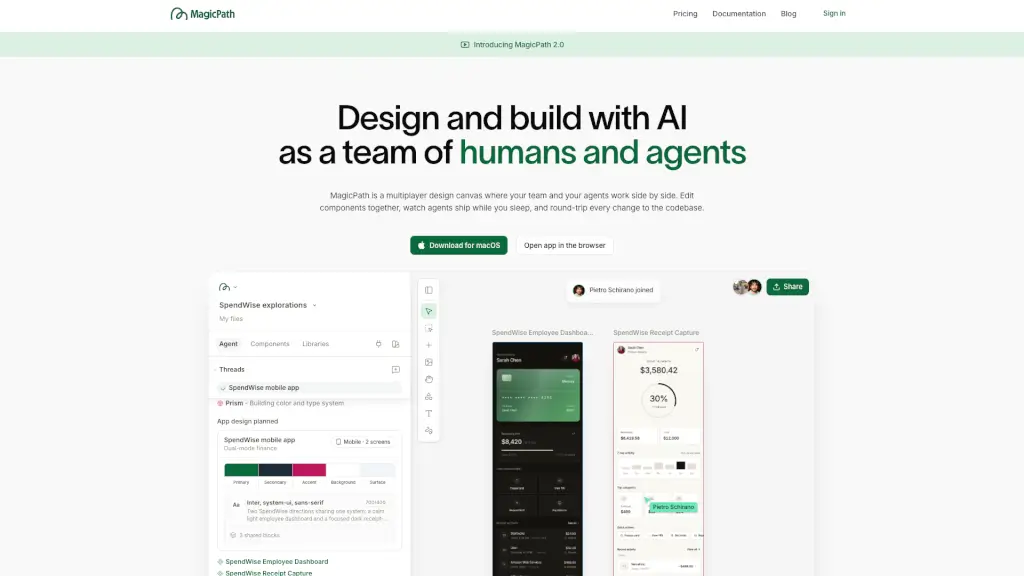
MagicPath is a shared workspace where humans and AI agents design and build together in real time. Think of it as a multiplayer canvas—your team and your AI collaborators can edit components side by side, with changes flowing seamlessly between design and code. Whether you're sketching a new feature or refining an existing one, MagicPath turns ideas into working prototypes instantly.
Unlike traditional design tools that create static mockups, MagicPath generates real, interactive React components that live in your codebase. Agents can keep working even when you’re offline—shipping updates, fixing bugs, or exploring design variations—so you come back to progress, not just pixels.
What are the features of MagicPath?
- Multiplayer & Multi-Agent Collaboration: Invite teammates and AI agents (like Codex, Claude Code, or Cursor) to work together on the same canvas in real time.
- Real-Time Design-to-Code Round-Tripping: Push designs directly into your repo as clean React code—or pull existing components into the canvas to edit visually and push back.
- External Agent Integration: Connect your preferred AI agents via the MagicPath skill (
npx skills add https://github.com/magicpathai/agent-skills --skill magicpath) to work from anywhere—even your terminal or phone. - Live Task & Project Sync: Link your Linear tasks, GitHub repos, or MCPs so agents act on real issues like “Fix login bug” or “Add billing page.”
- Instant Shareable Prototypes: Every design is a working web app with a unique URL—no more explaining how something should work; just share how it does work.
- Cloud-Powered Continuity: Your workspace lives in the cloud, so agents keep building while you sleep, travel, or take a break.
What are the use cases of MagicPath?
- A product designer requests “three homepage variations” and watches three AI agents generate them simultaneously for team review.
- A developer pulls a React button component from their repo into MagicPath, tweaks its padding visually, and pushes the updated code back with one click.
- A remote team syncs Linear tickets with MagicPath—agents automatically start designing the “billing page” as soon as the task status changes to “In Progress.”
- A founder shares a live prototype link with investors to demonstrate user flow, not just static screens.
- An engineer asks their AI agent via Slack to “update the login modal based on Figma feedback”—the change appears in MagicPath before their next coffee break.
How to use MagicPath?
- Start on desktop: Visit magicpath.ai using a computer for the best experience—download the macOS app or use the browser version.
- Create a new project: Click “New project” and describe what you want to build (e.g., “mobile task manager with focus timer”).
- Invite collaborators: Add human teammates or connect external AI agents using the built-in skill installer.
- Link your tools: Connect your GitHub repo, Linear workspace, or other systems so agents can read tasks and write code directly.
- Edit & iterate: Drag, tweak, and comment on components alongside agents—every change syncs to your codebase.
- Share instantly: Copy the auto-generated prototype link to show stakeholders a working version, not just a picture.