
What is GPT For Work?
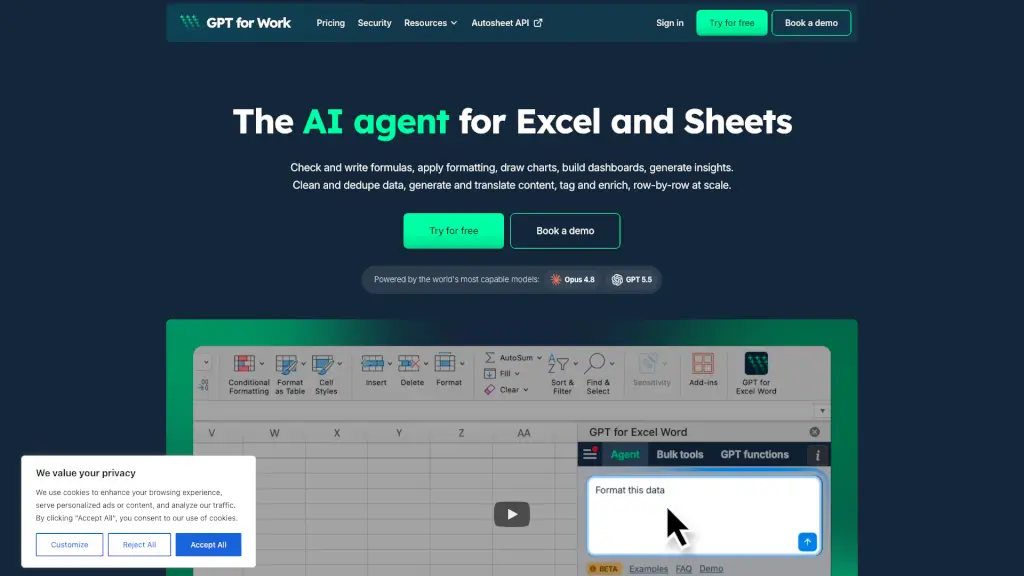
Meet GPT for Work – your all-in-one AI agent for Excel and Google Sheets. It’s like having a super-smart assistant that lives inside your spreadsheets. Whether you need to write formulas, format cells, clean messy data, or bulk-enrich thousands of rows, just tell it what you want in plain English. No prompts to master, no model switching – it picks the best AI for the job and gets to work. It’s built for anyone who spends time in spreadsheets, from everyday operators to power users, and it’s trusted by thousands of companies worldwide.
What are the features of GPT For Work?
- Bulk Row-by-Row Processing: Run one prompt across thousands of rows – clean, translate, categorize, enrich, score, and more – at up to 1,000 rows per minute. Perfect for large datasets.
- Smart Formula & Error Fixing: Automatically check and write formulas, detect and fix errors, format cells, build pivot tables, and create charts – all directly in your spreadsheet.
- GPT Functions for Dynamic Cells: Use
=GPT()and other specialized functions to generate content, translate, classify, or extract data. Reference other cells so prompts update automatically when data changes. - Autosheet API: Run the GPT for Sheets agent via a simple API call. Just send a prompt and a Google Sheet ID – no coding overhead.
- Multi-Model Support: Powered by top models like Opus 4.8 and GPT 5.5. You can choose your own provider or set a custom API key – no AI lock-in.
- Enterprise-Grade Security: ISO 27001 certified, GDPR compliant, zero data retention (we don’t train on your data), and encrypted in transit and at rest. Includes SSO with Microsoft Entra ID and Google OIDC.
What are the use cases of GPT For Work?
- Finance & Accounting: Close faster by standardizing exports, reconciling data, validating formulas, and building forecast models.
- Sales & Revenue Operations: Clean pipeline data, enrich records, score leads, and project growth – all in one go.
- E-commerce & SEO: Generate and translate product catalog content, enrich attributes, and scale metadata workflows across thousands of SKUs.
- HR & People Operations: Analyze headcount, build compensation models, and clean employee data without manual effort.
- Inventory & Supply Chain: Track stock levels, standardize supplier data, and support demand planning with real-time enrichment.
- Consulting & Research: Restructure datasets, run research and analyses, and produce decision-ready summaries – directly from your spreadsheet.
How to use GPT For Work?
- Install: Add GPT for Work to Excel or Google Sheets. It’s free to start and takes 30 seconds.
- Ask: Open the chat panel and type what you want in plain language – no special prompting skills needed.
- Watch it work: The agent reads your prompt, understands your spreadsheet, and executes changes in real time.
- Go deeper: Use
=GPT()functions in cells for dynamic prompts, or try the Autosheet API to automate workflows via code. - Track progress: For bulk jobs, you can see progress in real time, stop with one click, and fine-tune settings if needed.