
What is OmniAI?
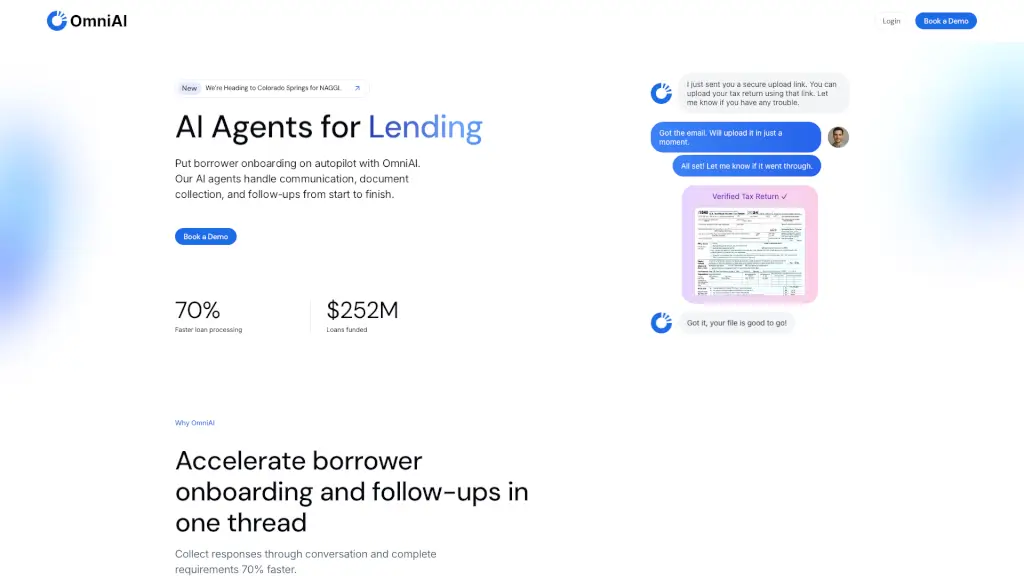
OmniAI is a game-changer for the lending industry, designed to streamline borrower onboarding and make the entire process smoother and faster. Imagine having AI agents that handle all the communication, document collection, and follow-ups with borrowers, from start to finish. This means your team can focus on more important tasks while OmniAI takes care of the nitty-gritty. With 24/7 availability and multilingual support, OmniAI ensures that borrowers are always in the loop, reducing drop-offs and speeding up loan processing.
What are the features of OmniAI?
- Conversational OnboardingBorrowers can reply by SMS or email, and OmniAI reads, verifies, and autofills every field, making the process 70% faster.
- Document CollectionAutomatically collect and verify documents like utility bills, rent rolls, and financial statements, ensuring everything is in order.
- Compliance GuardrailsEvery interaction is logged, providing a clear, audit-ready history, and maintaining 100% audit-trail coverage.
- 24/7 Borrower AssistantMultilingual SMS and email follow-ups keep borrowers engaged and moving forward without constant team oversight.
- Unified Data NetworkInstantly run soft credit checks, link bank accounts, and verify income with integrations like Plaid, Experian, and TransUnion.
- Security & PrivacyBuilt with security in mind, including private cloud options, SOC 2 compliance, and role-based access control.
What are the use cases of OmniAI?
- Mortgage LendingSpeed up the mortgage application process by automating document collection and follow-ups.
- Small Business LoansSimplify the onboarding process for small business loans, reducing the time from application to funding.
- Equipment FinancingStreamline equipment finance reviews, cutting down review times and improving decision-making speed.
- Consumer LoansEnhance the consumer loan experience by automating communication and document verification.
- Auto LoansMake the auto loan process smoother and faster, with automated follow-ups and document collection.
How to use OmniAI?
- Set Up Your AccountSign up for OmniAI and configure your account settings, including integrations and user permissions.
- Create a New Loan ApplicationStart a new loan application and input the borrower's basic information.
- Initiate CommunicationLet OmniAI take over, sending out the first message to the borrower via SMS or email.
- Monitor ProgressKeep an eye on the dashboard to track the progress of each application and see which documents are still needed.
- Review and ApproveOnce all documents are collected and verified, review the application and approve the loan.