What is DocuClipper?
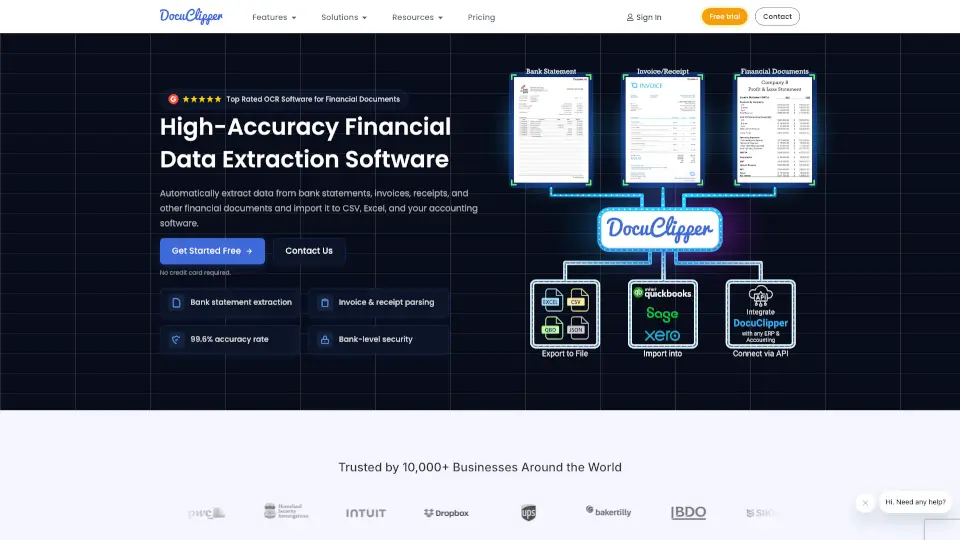
DocuClipper is your go-to financial data extraction software that makes quick work of extracting data from bank statements, invoices, receipts, and more. With 99.6% accuracy, it’s designed to save you time and reduce manual effort. Whether you're an accountant, business owner, or financial investigator, DocuClipper helps you automate data extraction and integrate seamlessly with tools like QuickBooks, Xero, and Excel.
What are the features of DocuClipper?
- Bank Statement Extraction: Automatically extract data from bank statements and reconcile transactions with ease.
- Invoice & Receipt OCR: Pull data from invoices and receipts in seconds, including line items and totals.
- Tax Form & Financial Document Support: Extract data from tax forms, P&L statements, and other financial documents.
- Seamless Integration: Export data directly to Excel, QuickBooks, Xero, Sage, and more.
- Advanced Security: SOC 2 certified with 256-bit encryption to keep your data safe.
- Custom Templates: Create templates to control what data is extracted.
What are the use cases of DocuClipper?
- Accountants/Bookkeepers: Streamline client data extraction and reconciliation.
- Business Owners: Track expenses and manage cash flow effortlessly.
- Financial Investigators: Analyze transactions for forensic audits.
- Lenders: Process loan applications faster with automated data extraction.
How to use DocuClipper?
- Upload Your Documents: Drag and drop bank statements, invoices, or receipts into DocuClipper.
- Automatic Extraction: Let the software extract data in seconds.
- Review & Edit: Check the extracted data for accuracy.
- Export: Send the data to Excel, QuickBooks, or your preferred accounting software.