Что такое Swiftask?
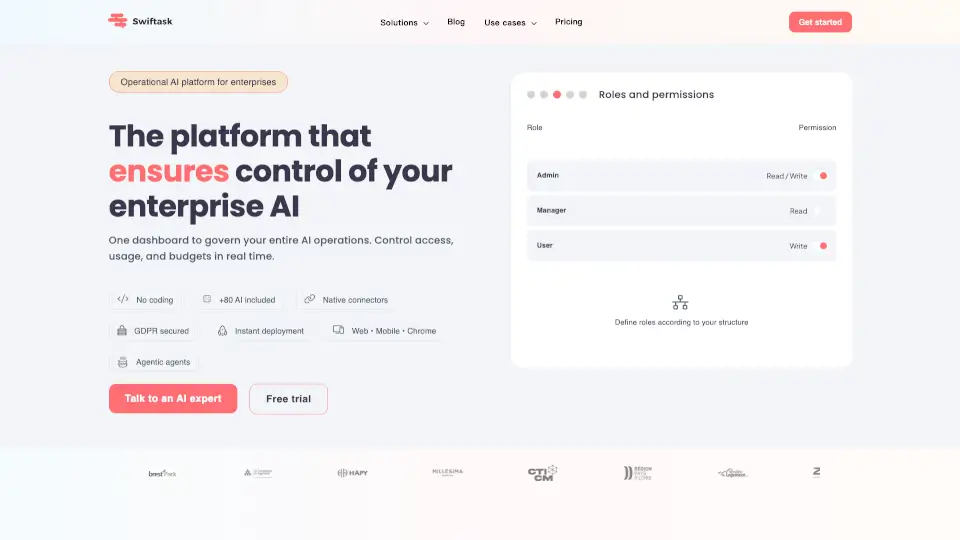
Swiftask — это no-code платформа для создания и оркестровки флота AI-агентов в корпоративной среде. Инструмент позволяет бизнес-командам без навыков программирования подключать агентов к более чем 3000 бизнес-инструментам (CRM, ERP, календари, Slack, Teams, Google Drive, SharePoint) и выбирать оптимальную LLM для каждой задачи (Claude, GPT, Gemini, Mistral). Платформа фокусируется на безопасности, соответствии GDPR и полном контроле над использованием ИИ: аудит каждого действия, управление ролями, лимиты затрат, гарантия, что данные не используются для обучения сторонних моделей. Swiftask подходит компаниям, которые хотят внедрить ИИ-агентов без vendor lock-in, с европейским хостингом и готовыми шаблонами для маркетинга, продаж, поддержки и других отделов.
Какие особенности у Swiftask?
- AI-агностическая оркестровка агентов: Выбор лучшей LLM для каждой задачи (Claude, OpenAI, Gemini, Mistral) без привязки к одному провайдеру. Пользователь может в одном чате переключаться между моделями.
- Библиотека готовых агентов: Предсозданные агенты для типовых ролей — Марк (разработчик), Джули (бизнес-коуч), Антуан (маркетолог), Томас (аналитик данных), Софи (копирайтер), Александрин (UX/UI). Можно развернуть первого агента за день.
- Подключение корпоративных знаний: Интеграция с Google Drive, SharePoint, файлами PDF/Word/Excel, индексированными URL. Агенты получают доступ к документам через RAG (Retrieval-Augmented Generation) и дают ответы с цитатами и источниками.
- Встроенные инструменты для сотрудников: AI-чат с несколькими моделями, генерация слайдов и веб-страниц, расшифровка встреч с автоматическими сводками и действиями, создание изображений. Без дополнительных подписок.
- Управление затратами и доступом: Настройка бюджетов на ИИ для каждого отдела, контроль, какие модели доступны каким пользователям, реальный мониторинг расходов и автоматические уведомления при превышении лимитов.
- Полный аудит и соответствие GDPR: Логи каждого взаимодействия: кто, когда, какую модель использовал, с какими данными, сколько стоило. Хостинг в Европе, сертификация ISO 27001, назначенный DPO.
- Многоагентная оркестровка: Возможность передавать задачу от одного агента другому, запускать каскадные сценарии (например, менеджер → писатель → дизайнер) для автоматизации сложных бизнес-процессов.
Какие случаи использования Swiftask?
- Отдел продаж: Автоматическая квалификация входящих лидов — агент обогащает данные о компании и контакте в реальном времени, ставит оценку от 1 до 5 звёзд и обновляет Zoho CRM без участия человека.
- Маркетинг: Перевод многоязычных карточек товаров (сокращение времени с 20 минут до менее 1 минуты) и создание новостных рассылок через многоагентную архитектуру (менеджер, писатель, дизайнер).
- Поддержка клиентов: Технический агент-консультант, интегрированный на сайт клиента, отвечает на сложные вопросы на основе базы документов CTICM. Сокращает количество ручных запросов, освобождая инженеров для высокоценных задач.
- Внутреннее обучение и онбординг: Агент «Антуан» — внутренний эксперт по продажам, обученный на всей базе продаж компании. Новые сотрудники становятся автономными с первого дня.
- Создание презентаций: Агент «Picasso» (на базе Claude) генерирует 16 профессиональных слайдов за 5 минут, строго соблюдая бренд-гайдлайны компании. Пользователь отвечает на предварительные вопросы, агент извлекает данные из нескольких источников.
- Управление проектами: Агенты обновляют задачи и канбан-доски в реальном времени, создают элементы в ERP/CRM и отправляют уведомления в Slack/Teams при наступлении определённых событий.
Как использовать Swiftask?
- Начните с создания рабочего пространства и добавления первого агента из библиотеки готовых шаблонов (например, «Марк — разработчик» или «Джули — бизнес-коуч»).
- Подключите корпоративные источники знаний: загрузите файлы (PDF, Word, Excel), укажите URL сайта или подключите Google Drive/SharePoint для индексации (до 128 документов, 512 файлов из SharePoint).
- Настройте права доступа и бюджет: укажите, какие модели LLM доступны для каждого отдела, задайте лимиты затрат в реальном времени.
- Определите триггеры и действия: например, «при получении нового сообщения в Slack — передать агенту для квалификации, затем обновить CRM и отправить уведомление».
- Запустите пилотный сценарий с одним агентом, протестируйте результат, затем масштабируйте до флота агентов для разных отделов.