
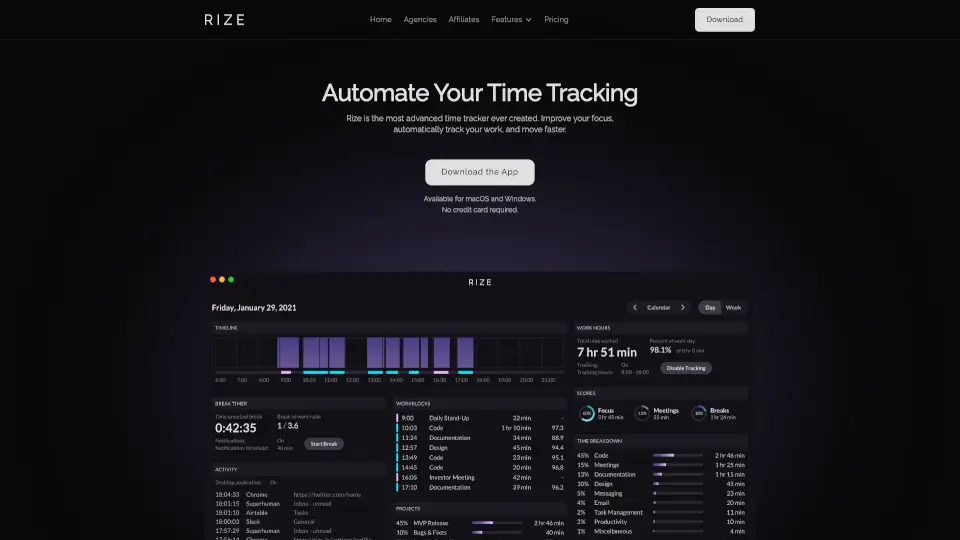
What is Rize?
Let’s be real — nobody likes filling out timesheets. Rize is an automatic time tracking tool that runs quietly in the background on your desktop. It captures every billable minute without you ever hitting “start” or “stop.” No timers, no screenshots, no guesswork. For managers, it rolls everything up into a live team dashboard showing utilization, billable vs. non-billable hours, and client profitability. Your team keeps working naturally, and you get accurate data you can actually trust.
What are the features of Rize?
- Automatic Time TrackingRize detects which app, browser tab, or document you’re using and logs the time — no manual entry needed.
- Smart Client & Project CategorizationMachine learning automatically assigns each work session to the right client, project, or task based on window titles and URLs.
- Team Visibility DashboardSee real-time utilization rates, billable vs. non-billable splits, and profitability by client or project — all without micromanaging.
- Privacy-First DesignNo screenshots, no keylogging, no webcam access. You control what you share with your team or employer.
- Focus & Wellness ToolsAutomatic focus detection, distraction blocking, and break reminders help your team stay productive and avoid burnout.
- AI Productivity CoachPersonalized weekly check-ins with work hour breakdowns and nudges to improve focus and balance.
- Integrations with Your ToolsWorks with Asana, Jira, Linear, ClickUp, Google Calendar, Notion, QuickBooks, and more — no migration headache.
What are the use cases of Rize?
- Creative & Digital AgenciesTrack billable hours across multiple clients without asking designers or copywriters to start and stop timers. Catch scope creep before it eats your margins.
- Law FirmsAttorneys can stop reconstructing timesheets at the end of the day. Rize captures research, drafting, and client calls by matter automatically — with attorney-client privilege intact.
- Accounting FirmsDuring tax season, track time spent on client files, tax prep, and advisory work without disrupting your team’s flow. Spot who’s overloaded before burnout hits.
- Marketing AgenciesKnow exactly how many hours go to each campaign, channel, or retainer. Report confidently and price your next project accurately.
- Professional Services (Consulting, IT)Accurately track engagement hours and forecast capacity so you can bill correctly and staff efficiently.
- Freelancers & SolopreneursStop guessing how long projects actually take. Rize runs silently so you can quote accurately and show clients exactly where the hours went.
How to use Rize?
- Download and install Rizeon your macOS or Windows computer — it’s a lightweight desktop app.
- Grant the necessary permissionsso Rize can read window metadata (app names and titles only, no screen content).
- Let it run in the background— Rize starts tracking automatically as you work across different apps and websites.
- Review and tag your timeat the end of the day (or week). Employees control what gets shared with leadership.
- Check the team dashboardto see utilization, billable hours, and client profitability at a glance.