What is Zed?
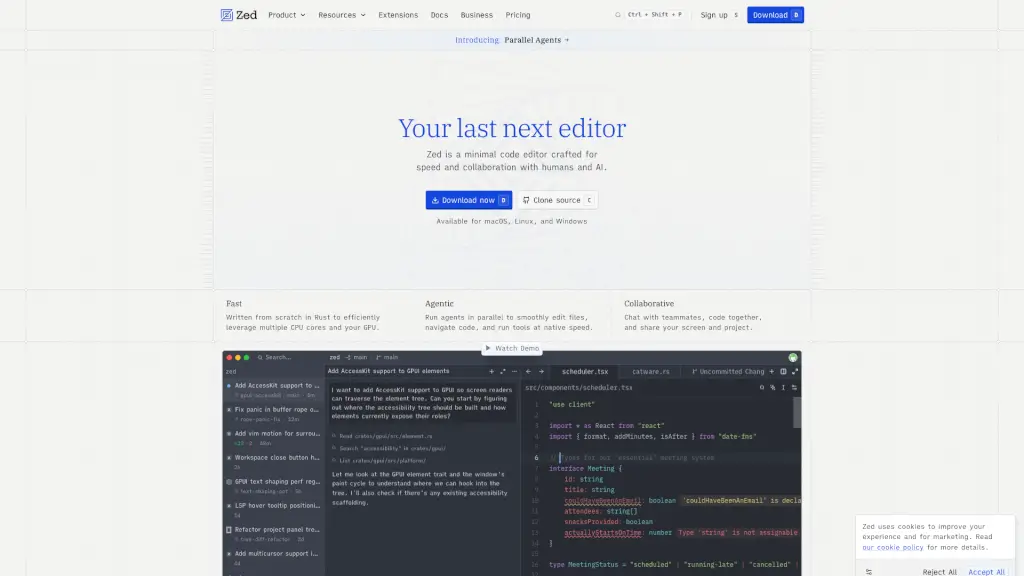
Zed is a blazing-fast, collaborative code editor built from the ground up in Rust by the creators of Atom and Tree-sitter. Designed for developers who value speed, simplicity, and seamless teamwork—whether with humans or AI—it reimagines what a modern coding environment can be. Unlike traditional editors that feel sluggish, Zed leverages your full machine (CPU cores and GPU) to deliver near-instant responsiveness.
At its core, Zed blends real-time collaboration, AI-powered coding assistance, and native performance into one intuitive tool. You can chat with teammates, share your screen, co-edit files live, and even run multiple AI agents in parallel—all without leaving your workflow. It’s not just an editor; it’s your coding partner for the future.
What are the features of Zed?
- Parallel Agents: Run multiple AI agents simultaneously across projects to automate tasks like refactoring, testing, or documentation while you stay in flow.
- Real-Time Collaboration: Code together with teammates using shared cursors, live chat, screen sharing, and synchronized project views—no extra setup needed.
- GPU-Accelerated Performance: Built entirely in Rust with GPUI, Zed uses your GPU and multi-core CPU for buttery-smooth typing, scrolling, and UI interactions.
- Agentic Editing: Delegate coding tasks to AI agents, watch them work in real time, and review or tweak changes before accepting—like pair programming with AI.
- Native Git & Debugging: Full Git integration (staging, commits, diffs) and Debug Adapter Protocol (DAP) support for debugging in multiple languages out of the box.
- Multibuffer Editing: Combine code snippets from different files into a single editable surface for easier refactoring and cross-file work.
- Vim & Helix Modes: First-class modal editing with full Vim keybindings, text objects, marks, and even Helix-style navigation for terminal lovers.
What are the use cases of Zed?
- Solo developers wanting ultra-fast editing with AI assistance that doesn’t break their focus.
- Remote engineering teams needing seamless real-time collaboration without juggling separate tools like VS Code Live Share or Slack.
- Open-source contributors looking for a lightweight, open-source editor with powerful LSP and Git support.
- AI enthusiasts who want to run custom or open agents (like OpenCode or Claude) directly inside their editor via ACP/MCP protocols.
- Researchers prototyping ideas quickly using inline AI transformations and edit prediction powered by Zeta2.
- Developers working on large codebases who benefit from project-wide diagnostics, outline views, and syntax-aware selections.
How to use Zed?
- Download Zed for macOS, Linux, or Windows from zed.dev and install it like any native app.
- Open a project folder—Zed automatically detects language servers and Git repositories.
- Use
Cmd/Ctrl + Kto open the command palette and access features like Git actions, agent runs, or settings. - Invite teammates via the collaboration button in the status bar to start co-editing instantly.
- Highlight code and press
Cmd/Ctrl + .to send it to an AI agent for transformation or explanation. - Customize your experience with community extensions for languages, themes, or icons from the Extensions tab.