
What is Wikiwand?
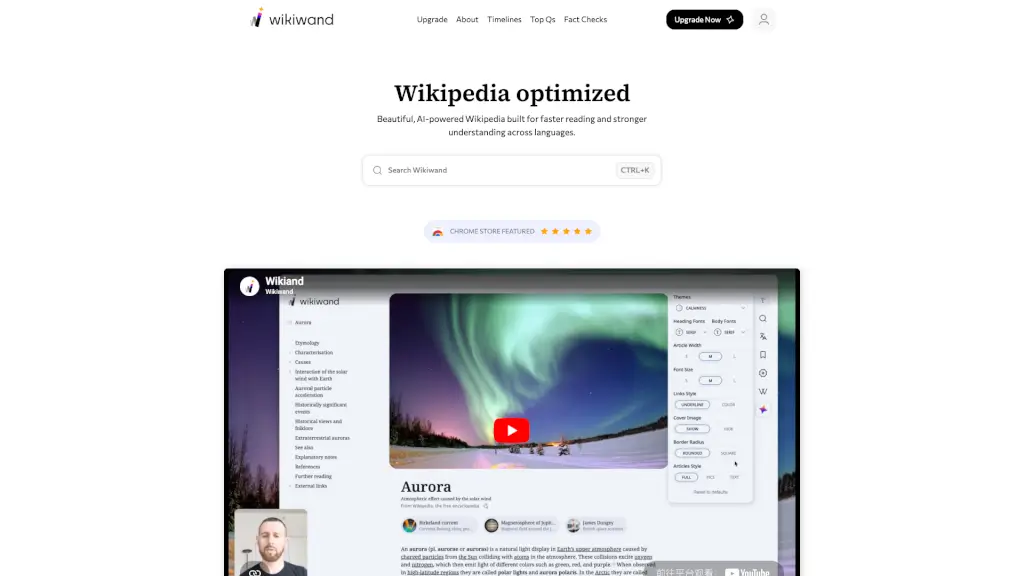
Wikiwand transforms your Wikipedia experience from a wall of text into a clean, modern, and AI-powered reading platform. Designed for faster comprehension and deeper understanding, it reimagines how you explore knowledge—whether you're researching for school, work, or just curiosity. With intuitive navigation and smart AI tools, Wikiwand makes complex topics easier to grasp across dozens of languages.
Gone are the days of cluttered pages and endless scrolling. Wikiwand enhances every article with timelines, top questions, and fact-checking insights, all while removing ads and offering customizable themes. It’s Wikipedia—but optimized for how people actually read and learn today.
What are the features of Wikiwand?
- AI-Powered Timelines: Automatically generated visual timelines that map key events in historical or biographical articles.
- Top Questions: AI-curated summaries of the most common and insightful questions readers have about a topic.
- Fact-Checking Layer: Real-time verification support to help assess the reliability of claims (available in Researcher Plan).
- Ad-Free Reading: Zero distractions—just clean, focused content forever.
- Dozens of Themes: Personalize your reading experience with light, dark, and custom color schemes.
- Unlimited Bookmarks: Save and organize articles effortlessly for later reference.
- Cross-Language Support: Enhanced readability and structure across multiple languages.
- AI Credits System: Use monthly credits to generate timelines, top Qs, and fact checks (1,000 in Pro; 5,000 in Researcher).
What are the use cases of Wikiwand?
- A student preparing for a history exam uses timelines to visualize the sequence of events in the French Revolution.
- A curious reader exploring the Colorado River gets instant answers to top questions like “Why is it drying up?” without digging through paragraphs.
- A researcher cross-checks scientific claims in the “Plasma (physics)” article using the fact-checking feature (Researcher Plan).
- A non-native English speaker switches to a high-contrast theme for better readability on long articles like “20th-century Western painting.”
- A lifelong learner bookmarks dozens of biographies—like Bruce Lee or Mahatma Gandhi—for a personal knowledge library.
- A journalist quickly verifies context around current events by comparing AI-generated timelines of related Wikipedia entries.
How to use Wikiwand?
- Install the Wikiwand browser extension from the Chrome, Firefox, or Edge store to auto-redirect Wikipedia pages.
- Press Ctrl+K (or Cmd+K on Mac) to open Wikiwand’s search bar and jump straight to any topic.
- Click the “Timeline” or “Top Qs” tabs on any supported article to access AI-generated insights.
- Go to your account settings to choose a theme that suits your eyes and mood.
- Upgrade to Pro or Researcher Plan to unlock AI features and remove usage limits.
- Use your monthly AI credits wisely—each timeline or top Qs generation consumes credits based on article length.