
What is Type AI?
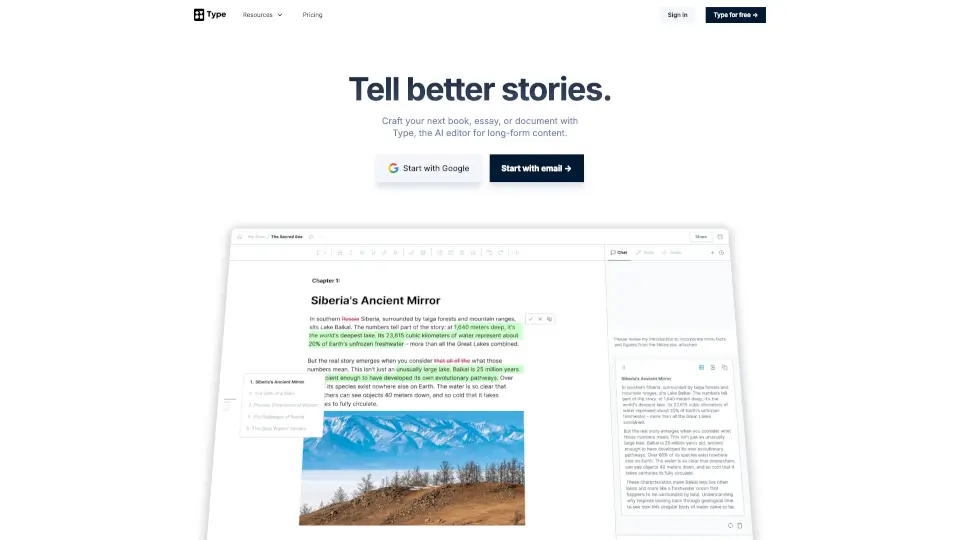
Type.ai is a free AI book writer and editor built specifically for storytellers who want to craft novels, screenplays, fan fiction, or any long-form creative work without the hassle of juggling multiple tools. Unlike generic chatbots, Type.ai integrates powerful AI directly into a full-featured word processor—so you can write, edit, and refine your story in one seamless workspace.
With over 300,000 writers already using it, Type.ai acts like a creative partner that remembers your characters, settings, and plot details. Whether you're drafting your first chapter or polishing your final manuscript, Type helps you stay focused on storytelling—not formatting or copy-pasting between apps.
What are the features of Type AI?
- Deep AI Integration: Chat with your AI assistant right beside your draft—no switching tabs or losing context.
- Story Memory (Notes): Save character profiles, world-building details, and scene notes so AI suggestions stay consistent and specific.
- Custom Writing Style Rules: Train the AI to match your unique voice, tone, and quirks for more authentic output.
- Multimodal Publishing: Export as DOCX, PDF, shareable URL, or even generate a high-quality AI-narrated audio version.
- Full Offline Mode: Write anywhere—even without internet—and sync when you’re back online.
- Privacy-First Design: Your data is never used to train AI models; everything stays private and secure.
- Professional Editor Tools: Keyboard shortcuts, version history, rich formatting (images, tables, math), and more.
What are the use cases of Type AI?
- Writing and editing a full-length novel up to 150,000 words in one document
- Developing complex screenplays with character arcs and scene continuity
- Creating immersive fan fiction with consistent lore and dialogue
- Brainstorming plots, titles, or character names using built-in free generators
- Revising and polishing drafts with AI-powered rewriting suggestions
- Collaborating privately on long-form stories without exposing work to public AI models
How to use Type AI?
- Sign up for free using Google or email—no credit card required
- Start a new document or import an existing Word/PDF file
- Use the “Notes” sidebar to define characters, settings, and key story facts
- Highlight text and use AI commands (like “rewrite,” “expand,” or “simplify”) directly in-editor
- Export your finished work as DOCX, PDF, or generate an audio narration
- Enable offline mode in settings to keep writing during travel or low-connectivity times