What is 魔音工坊?
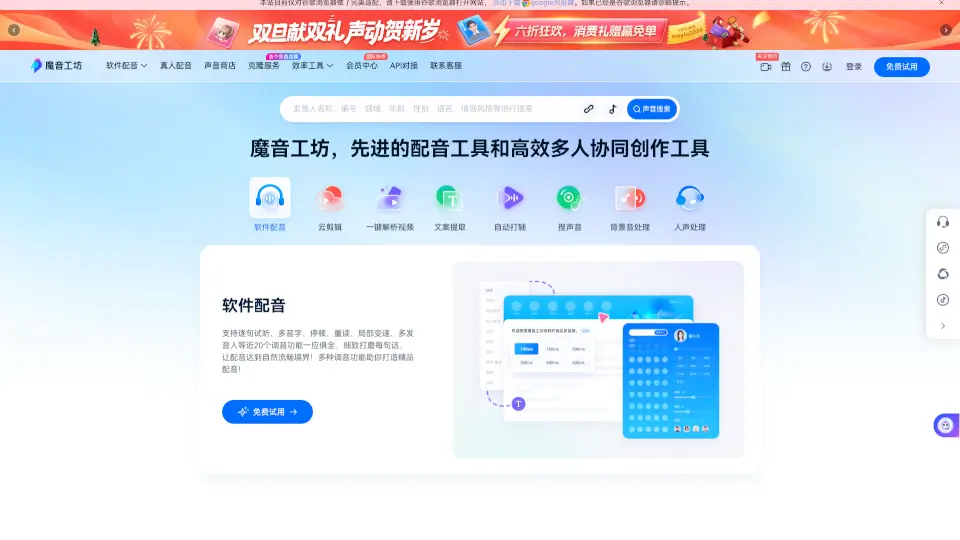
Welcome to MoYin Workshop, your go-to platform for AI voiceovers and audio books! Whether you're a content creator, filmmaker, or just someone who loves adding a professional touch to their videos, MoYin Workshop is here to help. With a wide range of realistic voices in different genders, accents, and languages, you can easily convert text into natural-sounding speech. This powerful tool is perfect for anyone looking to enhance their video or audio projects with high-quality, lifelike voiceovers.
What are the features of 魔音工坊?
- Text-to-Speech: Convert any text into natural-sounding speech with a variety of voices.
- Voice Customization: Fine-tune your voiceover with features like pauses, emphasis, and speed adjustments.
- Multilingual Support: Choose from over 19 languages and 15 dialects to fit your project's needs.
- Cloud Editing: Edit your audio files directly in the cloud with an intuitive interface.
- Collaboration Tools: Work with your team on projects, manage permissions, and share files seamlessly.
- Automatic Subtitling: Generate subtitles automatically, saving you time and effort.
- Background Music and Sound Effects: Add background music and sound effects to enhance your audio.
What are the use cases of 魔音工坊?
- Video Creators: Add professional voiceovers to your YouTube videos, TikTok clips, or Instagram stories.
- Podcasters: Create engaging and natural-sounding podcast episodes.
- E-learning Platforms: Enhance online courses with clear and engaging voiceovers.
- Business Presentations: Add a polished touch to your presentations and marketing materials.
- Audiobook Authors: Bring your stories to life with realistic and expressive narration.
- Social Media Managers: Quickly create and edit voiceovers for social media posts and ads.
How to use 魔音工坊?
- Step 1: Sign up for a free account on the MoYin Workshop website.
- Step 2: Enter the text you want to convert into speech.
- Step 3: Choose a voice and customize it using the available settings.
- Step 4: Preview and adjust the voiceover until it sounds perfect.
- Step 5: Download the final audio file and use it in your project.
- Step 6: Share your project and enjoy the professional results!