What is Medeo?
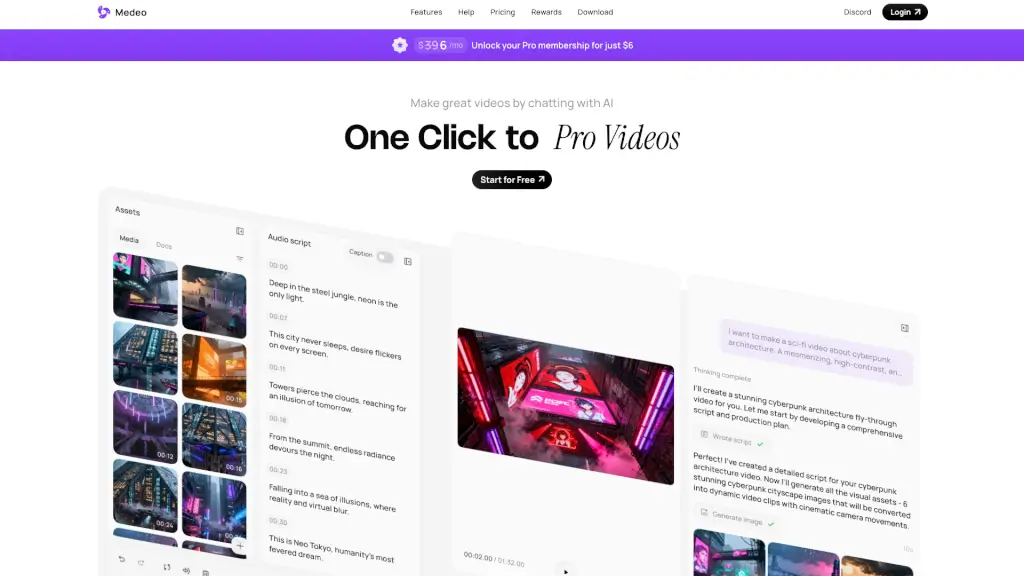
Welcome to Medeo, the AI video generator that turns your creative ideas into stunning videos with just a few chats. Whether you're a student, a marketer, or just someone with a great idea, Medeo makes it easy to create professional videos without any editing skills. Just chat with the AI, and watch as your text, audio, images, or links transform into engaging videos. No more complex tools or hours of editing—Medeo does all the heavy lifting for you.
What are the features of Medeo?
- Chat-based Creation: Turn your best ideas into video reality by simply chatting with the AI. If you can text, you can create.
- Chat-based Editing: Edit your videos like you're chatting with a real person. Say "Make this part faster" or "Change the music," and the video updates instantly.
- Character Consistency: Lock your character's identity and generate them in new locations, actions, and emotions while maintaining a perfect visual match.
- All-Purpose Production: One platform for all your needs. From marketing ads and educational explainers to animated shorts, Medeo can handle it all.
- All-in-One Assets: Access millions of stock images, videos, and hundreds of AI voices. You can also upload your own files, text, and URLs.
- The Visual Track: Intuitively modify and drag every sound, subtitle, and asset. The track stays perfectly synced with your script.
- Flexible Exports: Create once, publish everywhere. Effortlessly export your project in both 16:9 and 9:16 aspect ratios for perfect viewing on any device.
What are the use cases of Medeo?
- Marketing Ads: Create compelling ads for social media, websites, and email campaigns.
- Educational Explainers: Transform complex topics into easy-to-understand videos for students and learners.
- Animated Shorts: Bring your stories and characters to life with dynamic animations.
- Blog to Video: Convert your blog posts into engaging videos to reach a wider audience.
- Minecraft to Video: Turn your Minecraft maps into captivating videos.
- Slides to Video: Transform your presentations into dynamic, visually appealing videos.
- Image to Video: Turn your photos into stunning videos with just a few clicks.
- URL to Video: Convert any webpage into a video, perfect for tutorials and walkthroughs.
How to use Medeo?
- Start by logging into Medeo and selecting the type of video you want to create.
- Chat with the AI to describe your idea, and provide any text, audio, images, or links you want to include.
- Use the chat-based editing feature to make changes and refine your video. For example, say "Make this part faster" or "Change the music."
- Utilize the all-in-one assets to add stock images, videos, and AI voices, or upload your own files.
- Use the visual track to intuitively modify and drag every sound, subtitle, and asset.
- Finally, export your video in the desired format and share it with the world.