What is Blocs?
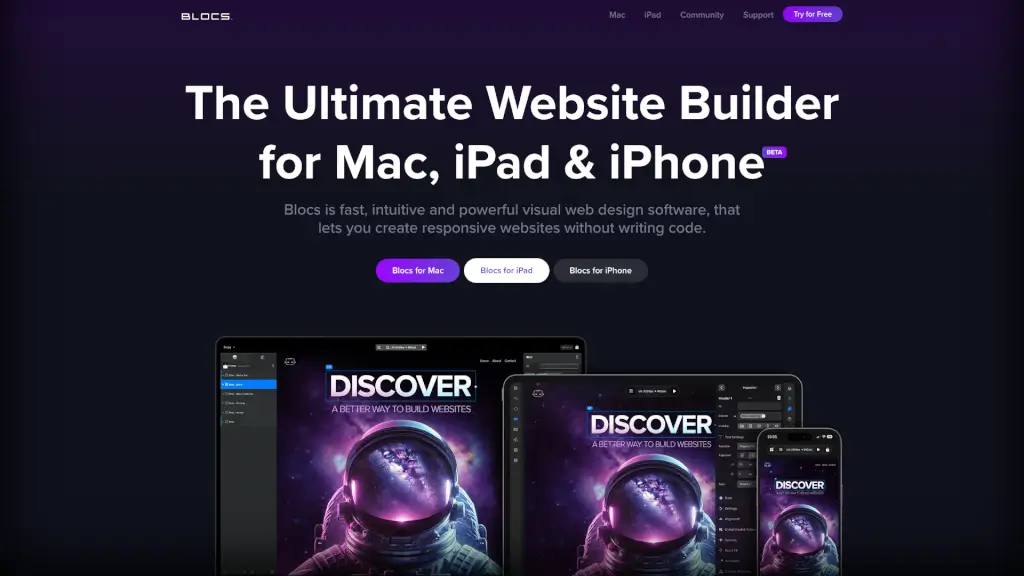
Blocs is a user-friendly, powerful website builder designed specifically for Mac, iPad, and iPhone users. Whether you're a beginner or a seasoned designer, Blocs makes it easy to create stunning, responsive websites without needing to write a single line of code. With its intuitive interface and robust features, you can bring your web design ideas to life in no time.
What are the features of Blocs?
- Responsive Design: Build websites that look great on any device, from desktops to smartphones.
- Visual Editor: Drag-and-drop elements to create your site with ease.
- Customizable Templates: Choose from a variety of templates and customize them to fit your brand.
- Developer API: Extend the functionality of Blocs with custom add-ons.
- Community Support: Join a vibrant community of designers and get help, feedback, and inspiration.
What are the use cases of Blocs?
- Small Business Owners: Create a professional website for your business without hiring a developer.
- Freelancers and Creatives: Showcase your portfolio and services with a beautifully designed site.
- Educators and Students: Build educational resources and project pages quickly and easily.
- Bloggers and Writers: Start a blog and share your stories with a visually appealing layout.
- Event Organizers: Promote events and manage registrations with a dedicated event page.
How to use Blocs?
- Choose a Template: Start by selecting a template that best fits your needs.
- Customize Your Site: Use the visual editor to add and arrange elements like text, images, and buttons.
- Add Content: Fill in your content, such as text, images, and videos.
- Preview and Test: Preview your site on different devices to ensure it looks great everywhere.
- Publish: Once you’re happy with your design, publish your site and share it with the world.