
What is ArtistAssistApp?
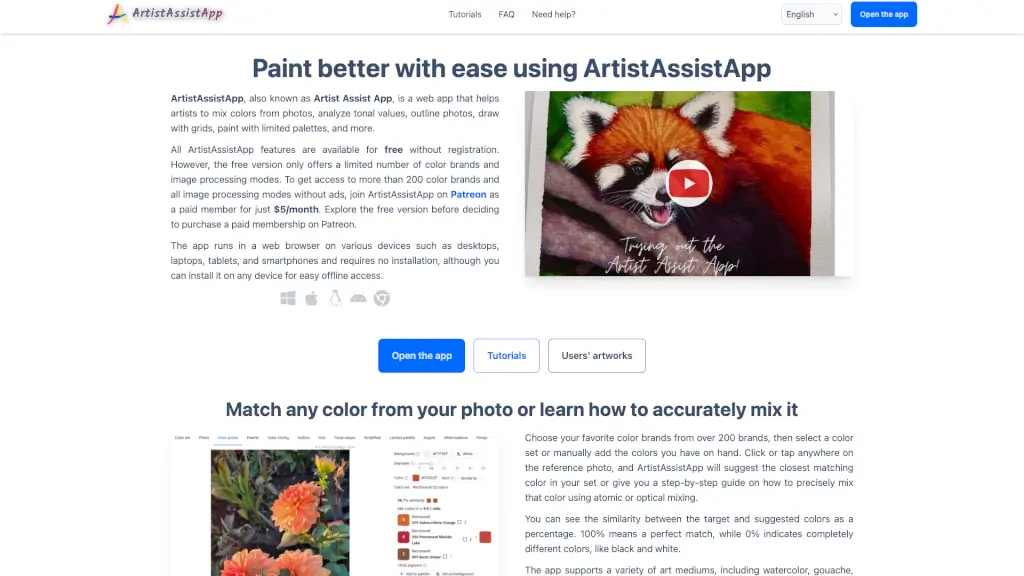
ArtistAssistApp is a powerful web app designed to help artists of all levels enhance their painting and drawing skills. Whether you're a beginner or a seasoned professional, this tool offers a wide range of features to make your artistic journey smoother and more enjoyable. From mixing colors from photos to analyzing tonal values, outlining images, and even applying artistic styles, ArtistAssistApp has everything you need to create stunning artworks. Best of all, it's accessible on any device with a web browser, making it incredibly convenient to use.
What are the features of ArtistAssistApp?
- Color MixingMix colors from over 200 brands and see step-by-step guides on how to achieve the perfect match.
- Tonal Value AnalysisAnalyze and improve the contrast in your paintings with tonal value sketches.
- Photo OutliningConvert photos into clean outlines for easy tracing and drawing.
- Grid DrawingDraw with grids to capture objects and scenes more accurately.
- Limited PalettesUse up to 7 primary colors to create harmonious and atmospheric paintings.
- Artistic Style TransferApply various artistic styles, including those of famous artists, to your photos for inspiration.
- Image AdjustmentsAdjust white balance, colors, perspective, and geometry of your painting photos for a professional look.
What are the use cases of ArtistAssistApp?
- Color Matching for RealismPerfect for artists who want to match colors from real-life references to their artwork.
- Tracing and Grid DrawingIdeal for beginners who prefer to trace or use grids to improve their drawing accuracy.
- Tonal Value StudyGreat for artists looking to enhance the contrast and depth in their paintings.
- Limited Palette ExplorationUseful for creating cohesive and harmonious color schemes in your artwork.
- Artistic InspirationHelps artists find new ideas by visualizing their photos in different artistic styles.
- Professional Photo EditingEssential for artists who want to present their work professionally online or in galleries.
How to use ArtistAssistApp?
- Upload a Reference PhotoStart by uploading a photo you want to work with.
- Choose Your ColorsSelect your preferred color brands and sets.
- Mix and MatchClick on the photo to get color mixing suggestions or outlines.
- Adjust and SaveMake adjustments to your image, such as tonal values, and save the results.
- Print and TracePrint outlines or grids for tracing onto your canvas or paper.
- Explore StylesApply different artistic styles to your photos for inspiration.