What is AITranslator.com?
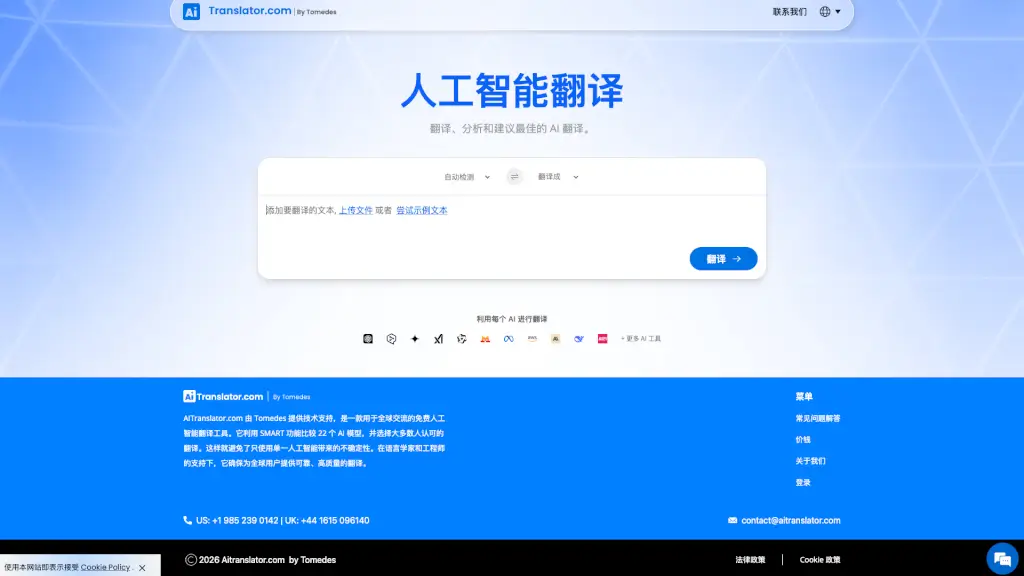
AITranslator.com, powered by Tomedes, is a free AI translation tool designed to make global communication easier and more accurate. Unlike other translation tools that rely on a single AI, AITranslator uses SMART technology to compare 25 different AI models, ensuring the most reliable and human-like translations. This approach not only enhances the quality of translations but also provides users with a more natural and contextually accurate experience. Whether you're a student, a business professional, or a traveler, AITranslator.com is your go-to solution for seamless language translation.
What are the features of AITranslator.com?
- SMART Technology: Compares 25 AI models to provide the most accurate and natural translation.
- Wide Language Support: Supports over 100 languages, including less common ones like Afrikaans, Amharic, and Quechua.
- User-Friendly Interface: Simple and intuitive design, making it easy for anyone to use.
- AI-Enhanced Translation: Uses advanced AI to understand context and provide more accurate translations.
- Free Access: No cost to use, making high-quality translation accessible to everyone.
- Continuous Updates: Regular updates to improve accuracy and add new features.
What are the use cases of AITranslator.com?
- Traveling Abroad: Quickly translate signs, menus, and conversations in real-time.
- Business Communication: Translate emails, documents, and presentations for international clients.
- Academic Research: Translate articles, books, and research papers from various languages.
- Social Media: Translate posts, comments, and messages to connect with a global audience.
- Personal Learning: Improve language skills by translating text and comparing it with original content.
How to use AITranslator.com?
- Select Source Language: Choose the language of the text you want to translate.
- Enter Text: Type or paste the text into the provided box.
- Choose Target Language: Select the language you want to translate the text into.
- Click Translate: Press the "Translate" button to get the translated text.
- Review and Use: Review the translation and use it as needed.