
What is Voicemaker?
Voicemaker® is a powerful text-to-speech (TTS) converter that turns written words into ultra-realistic spoken audio using advanced AI voices. Whether you're creating content for YouTube Shorts, professional presentations, e-learning modules, or social media, Voicemaker delivers natural-sounding speech that captures emotion, tone, and nuance—just like a human voice actor.
With over 2,000+ AI voices across 130 languages and accents, it’s built for creators, educators, marketers, and developers who need high-quality voiceovers fast. You can download your audio in popular formats like MP3 and WAV, making it easy to drop into any project without extra editing.
What are the features of Voicemaker?
- 2,000+ AI Voices: Choose from lifelike voices across 130 languages, including specialized tones for ads, storytelling, animation, education, and more.
- Multiple Voice Models: Access ProPlus (High-Res & Turbo), Pro V1/V2, FlashX, and Default engines—each optimized for speed, realism, or expressiveness.
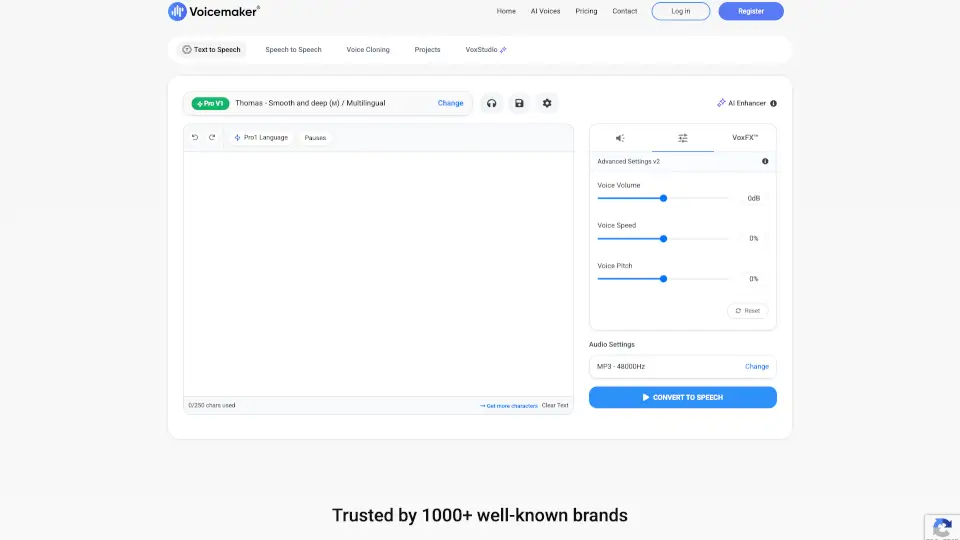
- Fine-Tuned Audio Controls: Adjust speed, pitch, volume, pauses, and emphasis with intuitive sliders for perfect vocal delivery.
- VoxFX™ Voice Effects: Apply real-world audio environments (like radio, stadium echo, or ASMR whisper) to transform how your voice sounds.
- Speech-to-Speech & Voice Cloning: Upload your own voice and convert it into another AI voice while preserving tone—or clone any voice with just one minute of audio.
- Multilingual & Subtitle Support: Generate voiceovers in multiple languages and download matching subtitles in SRT or TXT format.
- Studio-Grade Output: Download high-fidelity audio at 48 kHz sample rate in MP3, WAV, OGG, AAC, or OPUS formats.
What are the use cases of Voicemaker?
- Create engaging YouTube Shorts or TikTok videos with dynamic, on-brand narration.
- Produce professional e-learning courses or educational content in multiple languages quickly.
- Generate IVR greetings, customer support scripts, or automated phone system messages.
- Dub videos into 130+ languages while keeping the original speaker’s emotional tone.
- Build audiobooks, podcasts, or meditation guides with calm, expressive, or dramatic voices.
- Develop AI characters for games, apps, or virtual assistants using animated or stylized voices.
- Localize advertisements and trailers with region-specific accents and cultural authenticity.
How to use Voicemaker?
- Sign up or log in to access full features (free standard TTS is available without an account).
- Paste your text or upload a PDF, DOC, or TXT file—the system auto-converts it to editable text.
- Select a voice from categories like Pro Voices, Default, Cloned, or FlashX, filtering by language, gender, age, or use case.
- Use the sliders or presets to adjust speed, pitch, pauses, and add VoxFX™ effects like “Newscaster” or “ASMR Whisper.”
- Click “Convert to Speech” and preview your audio before downloading in MP3, WAV, or other formats.
- For long-form content, enable Studio Grade Stitching for smoother, higher-quality output (available on paid plans).