What is Take App?
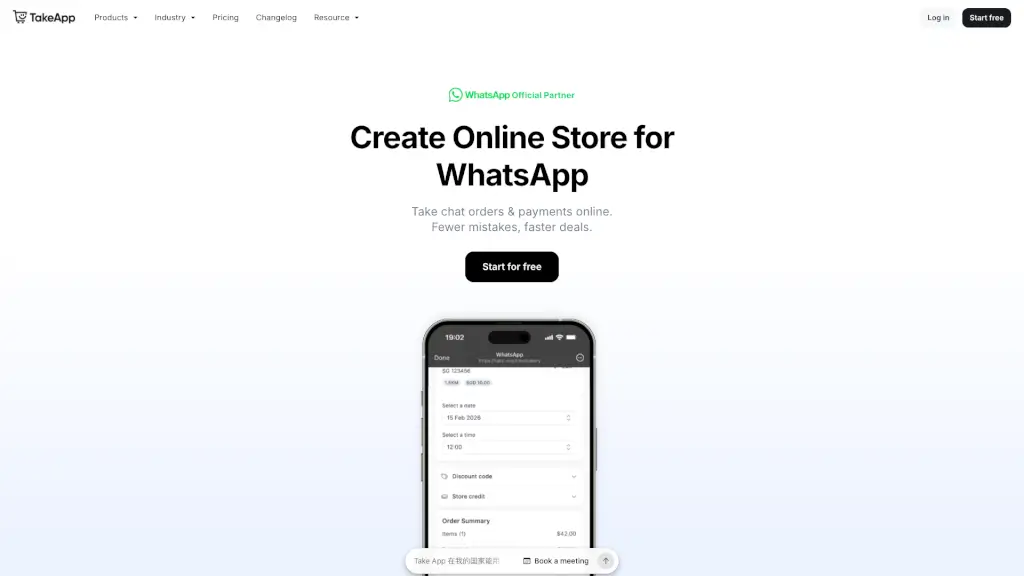
Tired of messy WhatsApp orders, missed payments, and chaotic spreadsheets? Take App turns your WhatsApp into a powerful online store—no coding or tech skills needed. It helps food businesses, retailers, and service providers take clean orders, accept local payments, and close sales faster, all while keeping conversations personal.
With Take App, customers place orders through a sleek web form linked to your WhatsApp, so you get complete details upfront—no more “What did they order again?” messages. Plus, it works in 180+ countries and supports 100+ local payment methods, from QR codes and bank transfers to cards and cash on delivery.
What are the features of Take App?
- WhatsApp Order Forms: Customers send structured, mistake-free orders directly via WhatsApp using a branded checkout page.
- Local Payment Support: Accept 100+ payment types—including real-time bank transfers, QR, COD, and cards—with instant payouts and low fees.
- Automated Chat Workflows: Set up welcome messages, payment reminders, and broadcast promos without lifting a finger.
- Beautiful Online Store: Get a mobile-friendly product catalog with SEO, custom domain support, and Instagram link-in-bio integration.
- Order Management Dashboard: Track status, view summaries, send invoices, and receive notifications—all in one place.
- Multi-Store & Staff Access: Manage several locations or give team members secure access (Business plan and up).
What are the use cases of Take App?
- A home-based baker in Singapore uses Take App to let customers order custom cakes via WhatsApp, choose pickup times, and pay instantly—cutting order errors by 90%.
- A grocery delivery service in Mexico sends automated restock alerts and accepts local bank transfers, boosting repeat sales without extra staff.
- A pop-up event vendor in Kenya takes pre-orders through a shareable link, syncs inventory, and processes payments on-site using the POS feature.
- An exporter in Morocco sells globally while letting international buyers pay via their preferred local methods—no complex gateways needed.
- A salon owner in Malaysia books appointments, collects deposits, and sends reminders—all through familiar WhatsApp chats.
How to use Take App?
- Sign up for free at takeapp.com and connect your WhatsApp Business number.
- Add your products, prices, and available payment options to build your online catalog.
- Share your unique store link on WhatsApp, Instagram bio, or flyers—customers click, choose, and pay.
- Receive clean orders directly in WhatsApp with full details, then fulfill with confidence.
- Use automation to follow up on unpaid orders or announce new menu items via broadcast.
- Upgrade to unlock features like custom domains, card payments, and team access as you grow.