What is Notis?
Notis: Your Smart Voice-to-Notion Assistant
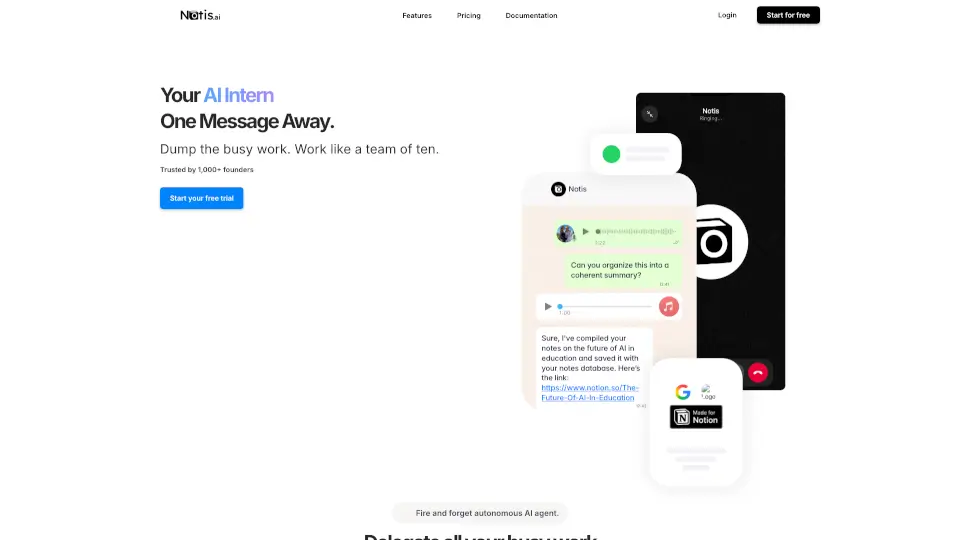
Notis is here to transform how you manage your productivity. This AI-powered tool lets you turn voice notes into structured tasks, meeting minutes, emails, and more—all within your favorite apps like WhatsApp, Telegram, or email. Say goodbye to juggling multiple apps and hello to a smarter way to stay organized, whether you're at your desk or on the go.
What are the features of Notis?
- Voice to Text Conversion: Easily transcribe voice notes into well-organized tasks, drafts, or outlines.
- Task Management: Create, prioritize, and set reminders for tasks directly from your messages.
- Meeting Minutes: Automatically summarize key points and action items from meetings.
- Expense Tracking: Snap receipts, categorize expenses, and generate expense reports.
- Content Creation: Draft emails, social media posts, or newsletters in your unique voice.
- CRM Integration: Manage contacts, log calls, and track deals effortlessly.
- Multilingual Support: Works in 56 languages for global users.
- Image Processing: Transcribe and organize images, including business cards and receipts.
What are the use cases of Notis?
- Busy Professionals: Capture meeting notes, manage tasks, and send follow-up emails on the go.
- Entrepreneurs: Track expenses, manage client relationships, and generate reports.
- Content Creators: Turn voice ideas into blog posts, newsletters, or social media content.
- Remote Workers: Stay productive with task reminders, meeting summaries, and document drafting.
How to use Notis?
- Getting Started: Sign up for Notis and connect it to your Notion workspace.
- Voice Commands: Send voice notes or messages to Notis via WhatsApp, Telegram, or email.
- Task Management: Create tasks, set priorities, and get reminders directly in your messaging apps.
- Expense Tracking: Snap receipts, and Notis will categorize and save them for you.
- Content Creation: Dictate your ideas, and Notis will craft polished drafts in your style.