
What is Granola AI?
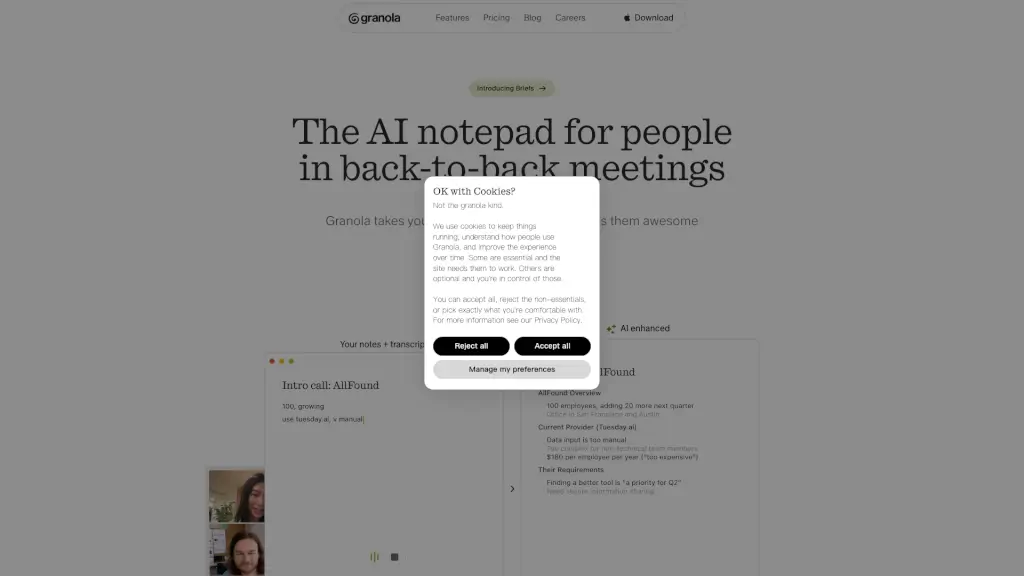
Granola is an AI notepad built for people drowning in back-to-back meetings. Instead of scrambling to take notes or missing key insights while trying to stay present, Granola listens, transcribes, and transforms your raw meeting content into clear, organized, and searchable notes—automatically. It works quietly in the background on your Mac or iPhone, with no bots joining your calls, so your conversations stay private and seamless.
The real magic happens after the meeting ends: Granola enhances your handwritten notes with AI-powered summaries, action items, and highlights, all tailored to your team’s workflow. Whether you’re running customer discovery calls, 1:1s, or product standups, Granola helps you capture what matters without breaking focus.
What are the features of Granola AI?
- AI-Powered Notepad: Turns live conversations into rich, structured notes using your device’s audio—no external bots or invites needed.
- Smart Meeting Templates: Customize note formats for common meetings like user interviews, sales calls, or team check-ins.
- Cross-Platform Support: Works seamlessly on Mac and iPhone, perfect for hybrid and mobile professionals.
- Instant Transcription & Enhancement: Automatically transcribes audio and upgrades your rough notes into polished summaries.
- One-Click Sharing: Share notes directly to Slack, email, Notion, or via public links—no copy-pasting required.
- Chat with Your Notes: Ask questions about past meetings using built-in AI that understands your full conversation history.
- Privacy-First Design: Audio is processed locally or securely; no third-party bots sit in on your sensitive discussions.
What are the use cases of Granola AI?
- Sales teams capturing key objections and next steps during discovery calls without missing a beat.
- Product managers documenting user feedback from interviews and instantly turning insights into roadmap items.
- Executives juggling back-to-back meetings who need accurate, searchable records without manual note-taking.
- Remote teams sharing structured meeting outcomes across time zones via Slack or Notion integrations.
- HR professionals conducting 1:1s or candidate interviews with secure, compliant note storage.
- Startups evaluating new tools (like AllFound) who need fast, clear summaries to compare vendors and make Q2 decisions.
How to use Granola AI?
- Download Granola for Mac or iPhone and grant microphone access for your meetings.
- Open Granola before your call—it will quietly record and transcribe your computer’s audio.
- Jot down quick notes during the meeting; Granola syncs them with the transcript in real time.
- After the meeting ends, let Granola auto-enhance your notes with summaries, action items, and highlights.
- Use customizable templates to format notes for specific meeting types (e.g., “Customer Discovery”).
- Share finalized notes with one click to Slack, email, or as a public link—no extra steps needed.