
Qu'est-ce que Ardot ?
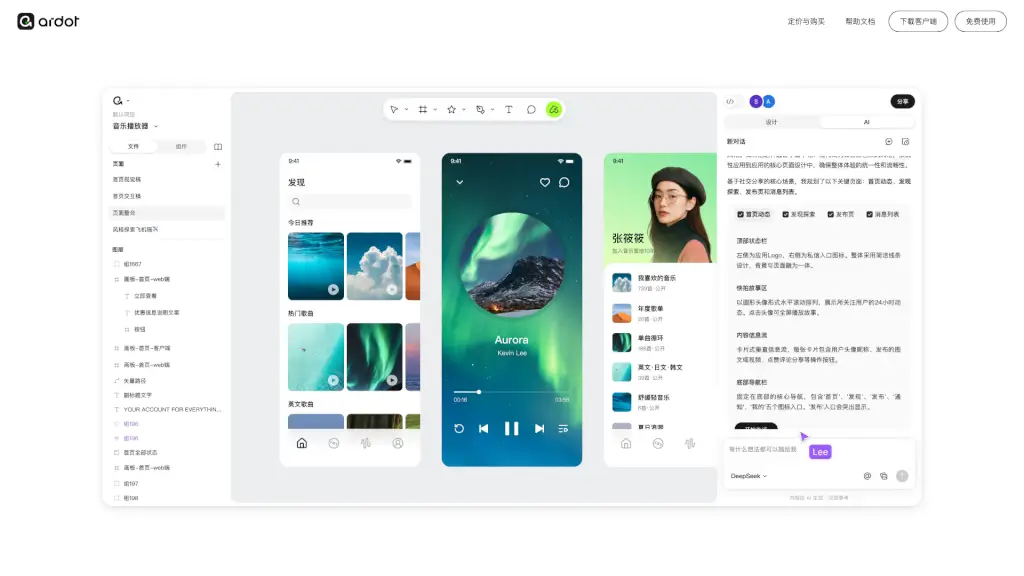
Tencent Design Ardot est un outil de conception intelligent alimenté par l’IA, conçu pour les designers et les équipes produit qui veulent transformer leurs idées en interfaces réelles, rapidement et efficacement. Grâce à des fonctionnalités comme la génération d’interfaces à partir de texte ou la conversion d’images en maquettes éditables, Ardot simplifie chaque étape du processus créatif — du premier croquis à la livraison au développeur.
Disponible gratuitement sur macOS et via une version web, Ardot combine puissance d’IA et outils professionnels : édition vectorielle avancée, système de mise en page dynamique, gestion centralisée des systèmes de design, et export direct de code. Le tout dans un environnement sécurisé, pensé pour la collaboration en entreprise.
Quelles sont les caractéristiques de Ardot ?
- Génération UI depuis du texte : Décrivez votre interface en langage naturel, et Ardot crée automatiquement une maquette avec mise en page et composants.
- Conversion image vers design : Importez une capture d’écran ou une photo, et l’outil extrait les calques pour créer une maquette entièrement éditable.
- Édition vectorielle avancée : Prend en charge des fonctions W3C comme le biseautage, la rotation 3D et des outils de forme améliorés pour des effets complexes.
- Système de mise en page dynamique : Utilise des grilles, des positions en pourcentage et un verrouillage d’aspect réel pour garantir une adaptation fluide sur tous les appareils.
- Système de design intégré : Synchronise globalement couleurs, styles de texte et composants réutilisables en un clic.
- Livraison design → développement : Affiche annotations, variantes de composants et génère du code prêt à l’emploi (CSS, iOS, Android).
- Sécurité et gestion d’équipe : Contrôle fin des permissions, suivi des actions et récupération automatique des accès en cas de départ d’un collaborateur.
Quels sont les cas d'utilisation de Ardot ?
- Un product owner décrit une nouvelle page d’accueil en quelques phrases → Ardot génère une maquette fonctionnelle en secondes.
- Un designer reçoit une photo d’une interface concurrente → il la transforme en fichier éditable pour s’en inspirer légalement.
- Une équipe agile collabore sur un même projet avec des rôles bien définis, sans risque de fuite de données sensibles.
- Un développeur frontend consulte directement la maquette pour copier du code CSS ou Swift sans demander de clarification.
- Une startup construit son premier système de design global, avec des styles cohérents appliqués automatiquement à tous les écrans.
- Un freelance livre un prototype interactif à son client avec annotations précises et options techniques intégrées.
Comment utiliser Ardot ?
- Téléchargez l’application macOS ou rendez-vous sur le site web officiel pour commencer gratuitement.
- Cliquez sur « Commencer la conception » et choisissez entre « Texte vers UI » ou « Image vers maquette ».
- Décrivez votre besoin en français ou anglais simple (ex. : « Une page de connexion avec logo, champ email, mot de passe et bouton bleu »).
- Éditez les éléments générés avec les outils vectoriels ou ajustez la mise en page grâce au système dynamique.
- Utilisez l’assistant IA intégré pour renommer des calques, générer des illustrations ou convertir un lien web en composant visuel.
- Partagez votre projet avec votre équipe, puis exportez les annotations ou le code directement depuis l’interface.