
What is AdScan.ai?
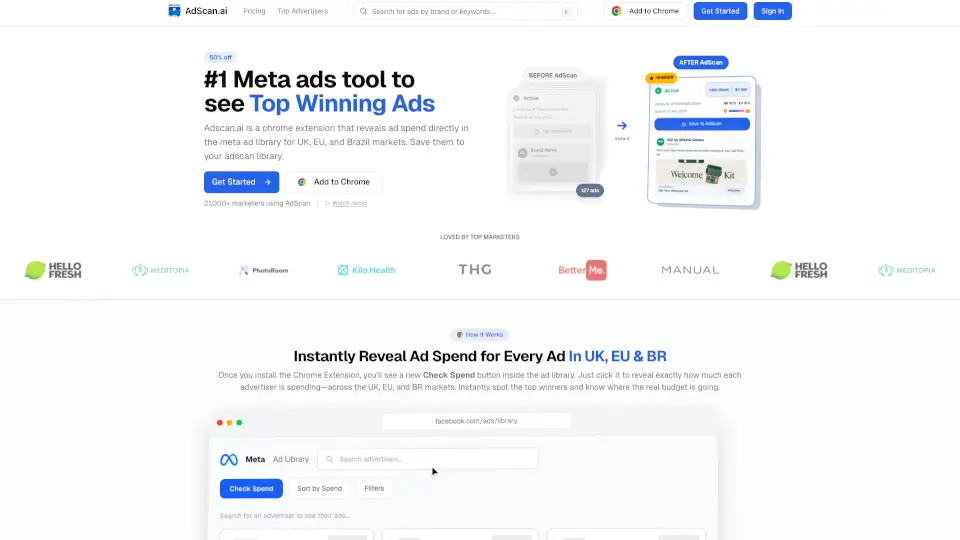
AdScan.ai is a Chrome extension that helps you find winning Facebook, Instagram, and LinkedIn ads by revealing ad spend data directly inside Meta's Ad Library. Instead of guessing which ads are actually getting budget, you see estimated spending, reach, audience demographics, and country breakdowns for the UK, EU, and Brazil. It then ranks ads by spend so you can instantly spot the top performers—then save, clone, and remix them with AI. Built for media buyers, marketers, and agencies who want to stop burning cash on fatigued creatives and scale fresh winners faster.
What are the features of AdScan.ai?
- Check Spend Button: Instantly reveals estimated ad spend, reach, gender, and country breakdown for any ad in Meta's Ad Library (UK, EU, Brazil markets).
- Auto-Sort by Spend: Automatically ranks active ads by spending level so you see the #1 winner first—no more scrolling through thousands of ads.
- AI Cloning Tools: Remix winning scripts for your own product, recreate visual styles without a designer, and launch in one click with Admanage.ai integration.
- Audience Insights: View gender breakdowns, geographic targeting data, and age demographics to validate if a competitor's winning ad fits your audience.
- Instant Video Transcripts: Extract full video scripts and ad copy in seconds for easy inspiration and remixing.
- Team Collaboration: Shared boards with real-time sync, comments, notes, and activity feed so your entire team can save and discuss winning ads.
- Multi-Platform Support: Works with Meta (Facebook & Instagram) and LinkedIn ads. More platforms coming soon.
What are the use cases of AdScan.ai?
- Competitor Ad Research: Uncover which ads your rivals are actually scaling (not just testing) by seeing their estimated spend.
- Finding Fresh Winning Creatives: Beat ad fatigue by discovering new winners from any niche—not just direct competitors.
- Creative Validation: Before adapting an ad format, check audience demographics to ensure it matches your target market.
- AI-Powered Ad Cloning: Turn a competitor's winning script into your own brand's version with AI rewriting, then launch quickly.
- Agency Team Workflows: Have your whole team save, comment, and organize winning ads on shared boards for faster campaign planning.
How to use AdScan.ai?
- Install the Chrome Extension from the AdScan website or Chrome Web Store.
- Go to Meta's Ad Library (facebook.com/ads/library) and search for any brand or advertiser.
- Click the "Check Spend" button that appears on each ad card to reveal estimated spend, reach, and demographic data.
- View auto-sorted results — ads are ranked by spend so you instantly spot the top winner.
- Save winning ads to your AdScan dashboard, add them to boards, and use AI cloning to remix scripts or recreate visuals.
- Collaborate with your team via shared boards to streamline creative testing and decision-making.