
What is Chorus Songwriting App and Lyrics Assistant?
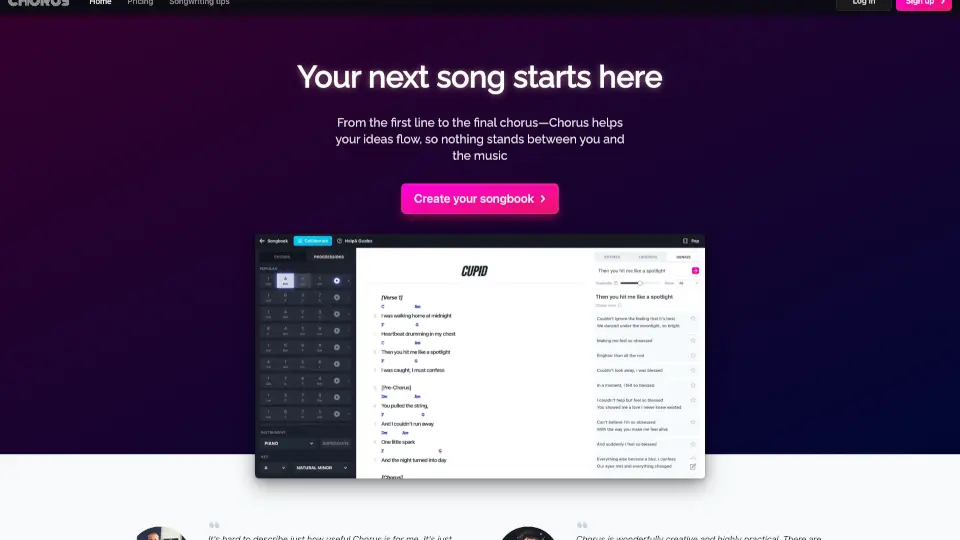
Chorus is an AI-powered songwriting app and lyrics assistant designed for songwriters, producers, and music creators at any level. It helps turn first lines into complete songs by offering smart rhyme suggestions, line starters, chord progressions, and daily training exercises. Built by professional songwriters, Chorus keeps you in a single workflow without switching tabs. Ideal for overcoming writer’s block, improving lyrics, and building songwriting skills through repetition rather than waiting for inspiration.
What are the features of Chorus Songwriting App and Lyrics Assistant?
- Smart Rhymes: Finds natural, singable rhymes tailored to your genre directly inside your lyrics, so you don’t have to leave your writing flow.
- Triggers: Provides genre-specific starting words or phrases for your next line or verse, helping you maintain momentum when ideas run dry.
- Genius Assistant: Enter a single lyric, word, or phrase, and Chorus generates fresh continuation ideas, keeping you from staring at a blank page.
- Chord Explorer: Discover rich, singable chord progressions without music theory knowledge—hear ideas instantly and focus on the song, not scales.
- Daily Training Exercises: Short, structured drills on hooks, rhymes, melody, structure, and editing help you build craft through consistent practice.
- Collaborative Writing Sessions: Work live with other writers in real time, making it a practical tool for co-writing sessions.
What are the use cases of Chorus Songwriting App and Lyrics Assistant?
- Solo songwriter stuck on a second verse uses Genius to generate line ideas and keep the song flowing.
- Beginner learning songwriting completes daily training exercises to build rhyming and melody skills.
- Producer or co-writer uses chord explorer to quickly find a progression that fits the mood of a track.
- Non-native English writer uses genre-filtered rhymes and triggers to improve lyric naturalness and phrasing.
- Songwriter testing a new idea opens the demo with “Cupid” and tries different genre settings to see how suggestions change.
How to use Chorus Songwriting App and Lyrics Assistant?
- Open Chorus in your browser or install the app to start a new songbook.
- Type your first lyric line, then tap the rhyme or trigger button to get suggestions filtered by your chosen genre.
- If stuck, highlight a phrase and activate Genius to receive continuation ideas.
- Use the chord panel to pick a single chord or a full progression, playing it back to hear the sound.
- Visit the daily practice section to take a short exercise on hooks or structure and track your progress.