What is Tencent WorkBuddy?
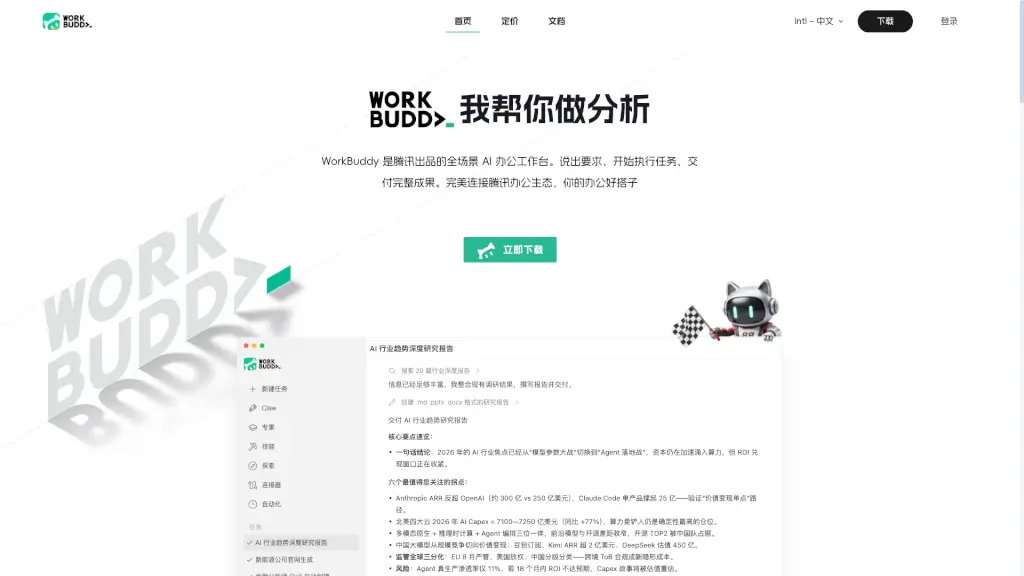
WorkBuddy is an AI Agent office tool developed by Tencent Cloud Code Assistant that goes way beyond simple chat. Instead of just giving you advice, it actually completes your work tasks. You tell it what you need in plain English, and it plans, executes, and delivers finished results like reports, presentations, or data analysis. It supports multiple AI agents working together at the same time, making it perfect for anyone tired of repetitive office work.
What are the features of Tencent WorkBuddy?
- Autonomous Task Planning: WorkBuddy doesn't just answer questions. It breaks down your request into a clear plan, searches for information, analyzes data, and creates final deliverables without you having to guide it step by step.
- Multi-Agent Parallel Execution: Several AI agents can work on different parts of your task simultaneously. This means you get complex results much faster, like a full industry report with both Word and PowerPoint versions.
- Seamless Office Ecosystem Integration: It connects directly with popular tools you already use, including Jira, Google Drive, GitHub, Linear, Office, Notion, and Slack. No more switching between apps.
- Multi-Format Report Generation: Create professional documents in Markdown, Word (.docx), and PowerPoint (.pptx) formats from a single request. It even handles the formatting and structure for you.
- Built-in Expert Skills: Access specialized skills pre-built for common tasks like data analysis, user feedback collection, and work report generation. These are ready to use right out of the box.
- Cross-Platform Availability: Available on Mac (ARM64 and x64) and Windows (x64, compatible with ARM64). You can also access it through WeChat and WeCom (Enterprise WeChat) for mobile commands.
What are the use cases of Tencent WorkBuddy?
- Deep Research Reports: Ask WorkBuddy to research a topic like "AI industry trends 2026," and it will search multiple sources, cross-verify information, and deliver a structured report with key insights and recommendations.
- Weekly Work Report Generation: Instead of manually compiling your week's achievements, just tell WorkBuddy to create a work report. It will gather the necessary data and format it into a professional document.
- Data Analysis and Visualization: Upload a spreadsheet and ask for an analysis. WorkBuddy can process the data, identify trends, and present the findings in charts or written summaries.
- PPT Creation for Presentations: Describe the presentation you need, and WorkBuddy will generate a complete PowerPoint file with slides, content, and a logical structure.
- Company Website Drafting: Need a quick draft for a new company webpage? WorkBuddy can generate content and even suggest a basic structure, saving you hours of starting from scratch.
- User Feedback Collection and Analysis: Hand over raw feedback data, and WorkBuddy can organize, categorize, and summarize the key points into an actionable report.
How to use Tencent WorkBuddy?
- Start a New Task: Click the "New Task" button and describe what you need in natural language. For example, "Analyze current AI trends and create a markdown, word, and ppt report."
- Let the AI Work: WorkBuddy will automatically start planning. It will show you its progress, like "Searching 20 industry reports..." and then "Creating .md, .pptx, .docx files."
- Review the Results: Once the task is complete, you'll receive a summary of key findings and links to download the generated files. You can review the process and the final outputs.
- Use Built-in Experts: For specific tasks, like "Data Analysis" or "Work Report," select the relevant "Expert" skill from the interface to get more specialized assistance.
- Connect Your Tools: Go to the "Connector" section to link your existing accounts (Jira, Notion, etc.). This allows WorkBuddy to access your files and data directly.