
What is Swell AI?
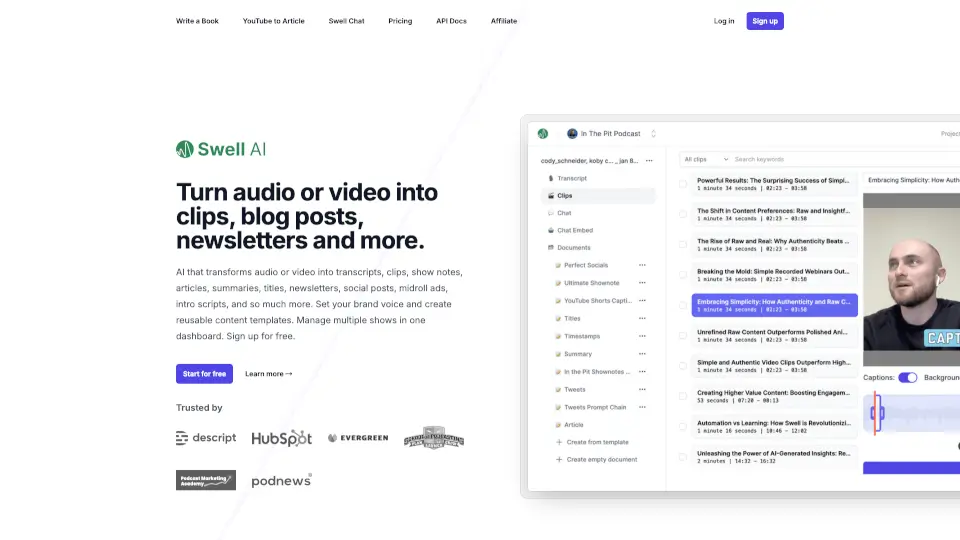
Swell AI is a smart content repurposing tool that turns your audio or video—like podcasts, YouTube videos, or interviews—into dozens of ready-to-use marketing assets. Instead of spending hours editing, writing, or clipping, Swell AI uses AI to automatically generate transcripts, blog posts, social media snippets, newsletters, show notes, and more in seconds.
Whether you're a solo creator or manage multiple shows for clients, Swell AI helps you maximize every minute of content without hiring a team. Just upload your media, pick your outputs, and publish everywhere—saving you time while keeping your brand voice consistent.
What are the features of Swell AI?
- AI-Powered Repurposing: Instantly transforms audio/video into articles, social posts, summaries, titles, newsletters, audiograms, and midroll ads.
- Smart Transcript Editor: Highlight, clip, and save key moments with auto-suggested "spicy" sections and speaker labels.
- Brand Voice & Templates: Set your tone and reuse custom templates across episodes for consistent messaging.
- Swell Chat (Episode Q&A): Every uploaded episode gets its own AI chatbot so listeners can ask questions about the content.
- Multi-Show Dashboard: Manage all your podcasts or video series in one place with unique settings per project.
- Bulk Import & Backfill: Connect RSS feeds, YouTube, or Apple Podcasts to auto-process past episodes.
- Team Collaboration: Share transcripts and clips via link and work together seamlessly.
- REST API & Integrations: Connect to Dropbox, Google Drive, Zoom, Omny Studio, and more—or build custom workflows with the developer-friendly API.
What are the use cases of Swell AI?
- A podcaster turns each episode into SEO-friendly blog posts, LinkedIn updates, and Instagram captions in minutes.
- A marketing team backfills 50 old YouTube videos with transcripts, summaries, and Twitter threads overnight.
- A solopreneur uses Swell AI to create weekly newsletters from their podcast without writing a single word.
- An agency manages client podcasts in one dashboard, applying branded templates and exporting content directly to Canva or email tools.
- A content creator builds an interactive chatbot for each episode so fans can explore topics deeper.
- A small business owner converts webinar recordings into lead-generating blog articles and social clips.
How to use Swell AI?
- Upload your audio or video file—or connect your YouTube, RSS, or cloud storage account.
- Let Swell AI auto-generate a transcript with speaker labels and suggested highlights.
- Use the editor to clip key moments or accept AI-generated content like blog posts, social threads, or show notes.
- Apply your brand voice and templates to ensure consistent tone across all outputs.
- Export or share your content directly to Google Drive, Dropbox, or your CMS—or copy/paste into social schedulers.
- Enable Swell Chat to let your audience interact with each episode via AI-powered Q&A.