
What is Rune?
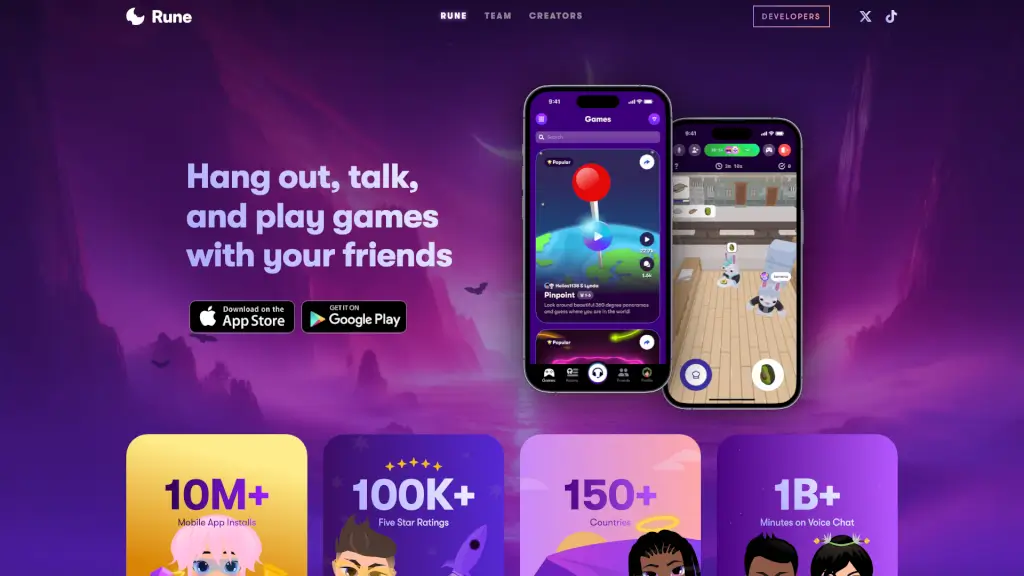
Rune is the ultimate hangout spot for you and your friends, where you can play games, chat, and share amazing experiences together. With over 10 million mobile app installs and 100,000 five-star ratings, Rune is a favorite among gamers and socializers alike. Whether you're looking to unwind after a long day or just want to have some fun, Rune offers a seamless and ad-free experience right from your phone. No need to juggle multiple apps—everything you need is right there in one place.
What are the features of Rune?
- Voice Chat: Enjoy high-quality voice chat with your friends while playing games. Over 1 billion minutes of voice chat have been logged, making it easy to stay connected.
- In-App Games: Play a wide variety of multiplayer games directly within the voice room. From classic board games to quirky new titles, there's always something fun to try.
- Global Community: Connect with players from over 150 countries. Rune is a vibrant community where you can make new friends and join squads from around the world.
- No Ads: Say goodbye to annoying ads. Rune provides a clean, distraction-free environment so you can focus on having fun.
- Regular Updates: Developers from all over the world are constantly adding new games and features, ensuring there's always something fresh to explore.
What are the use cases of Rune?
- Game Night with Friends: Organize a virtual game night and play your favorite multiplayer games while chatting in real-time.
- Finding New Friends: Join public rooms and meet people who share your interests. It's a great way to expand your social circle.
- Team Building: Use Rune for team-building activities at work or school. The variety of games and voice chat make it perfect for remote teams.
- Study Groups: Create a private room for your study group and use the voice chat to discuss assignments and projects.
- Casual Hangouts: Just want to chill? Hop into a voice room and catch up with friends without the pressure of a structured activity.
How to use Rune?
- Download the Rune app from the App Store or Play Store.
- Create an account or log in with your existing credentials.
- Explore the different rooms and find one that suits your interests.
- Start a voice chat with your friends or join an ongoing conversation.
- Choose a game to play and invite your friends to join in.
- Customize your profile and settings to enhance your experience.