What is Lingolette?
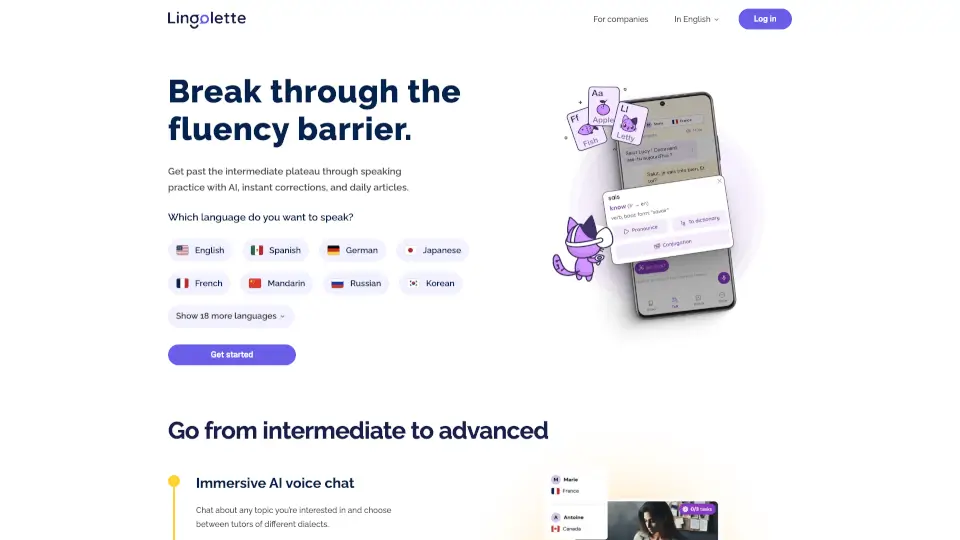
Lingolette is an AI-powered language teaching machine designed to help you break through the intermediate plateau and achieve spoken and written fluency. Through real-time conversations with an AI tutor, instant corrections, and personalized daily articles, Lingolette adapts to your level, interests, and pace — making practice feel natural and effective. Whether you're learning English, Spanish, German, Japanese, or one of 20+ other languages, Lingolette turns passive study into active speaking practice.
What are the features of Lingolette?
- Immersive AI Voice Chat: Chat about any topic you’re interested in with tutors who speak different dialects, just like a real conversation.
- Learn Words in Context: Click any word to instantly see its meaning, pronunciation, and add it to your personal dictionary.
- Daily Articles with Questions: Read articles tailored to your interests, then test your understanding with comprehension questions. Your AI tutor can discuss the article with you.
- Instant Corrections & Guidance: Get clear, step-by-step corrections as you speak or write, helping you improve rapidly without feeling judged.
- Personalized Experience: Lingolette adjusts to your current level, interests, and schedule, so every session is relevant and efficient.
- Mobile & Browser Access: Practice anytime on your phone or computer — sessions as short as 15 minutes fit into any routine.
What are the use cases of Lingolette?
- Intermediate learners stuck on the plateau: Use AI voice chat to push past repetitive phrases and build natural fluency through real topics.
- Busy professionals with limited time: Fit in 15-minute practice sessions during commutes or breaks, with content tailored to your industry or hobbies.
- Learners who get nervous speaking: Practice in a judgment‑free environment with an AI tutor that encourages you to talk more and corrects mistakes kindly.
- Multilingual learners: Switch between 20+ languages, including less common ones, all in one app without needing separate tools.
- Students preparing for exams: Use daily articles and discussion questions to improve reading comprehension and oral expression simultaneously.
How to use Lingolette?
- Step 1: Sign up on Lingolette and choose the language you want to speak (English, Spanish, German, etc.).
- Step 2: Start a voice chat with the AI tutor — pick any topic you’re interested in, or begin with a daily article.
- Step 3: Speak naturally; the AI will instantly correct your grammar, pronunciation, and vocabulary choices.
- Step 4: Tap any unfamiliar word to see its definition and add it to your personal dictionary for later review.
- Step 5: Answer questions about the article you read, then discuss your answers with the tutor to deepen understanding.
- Tip: Use the mobile app to practice on the go, or stick with the browser version for desktop sessions.