
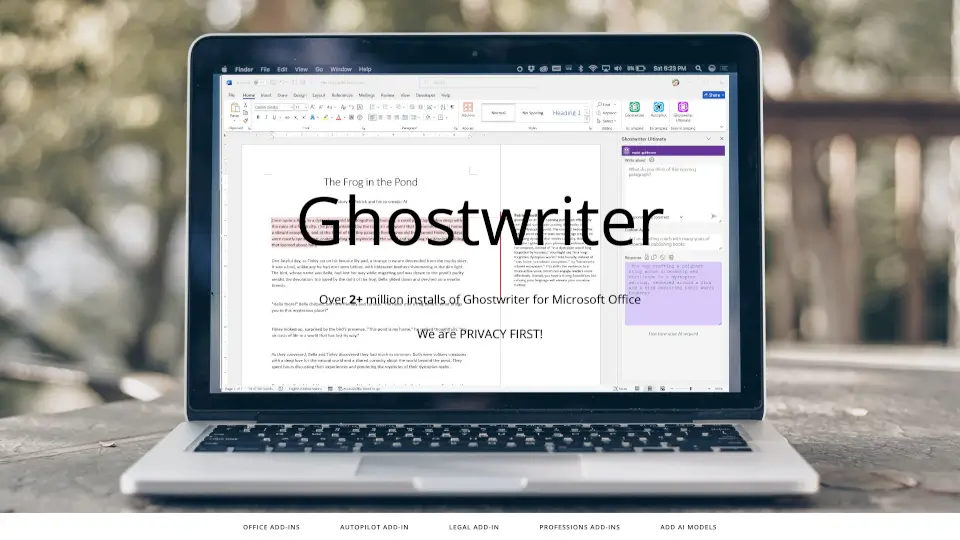
What is Ghostwriter Add-ins for Microsoft Office?
Introducing Ghostwriter Add-ins for Microsoft Office, your ultimate writing assistant that helps you brainstorm, plan, and create content faster than ever. With over 1.9 million installs, we prioritize your privacy while enhancing your productivity.
What are the features of Ghostwriter Add-ins for Microsoft Office?
- Ghostwriter Word Basic: Perfect for students, offering various writing styles and tones.
- Ghostwriter Word PRO: Used by over half a million users, includes quick action prompts and language translation.
- Ghostwriter Word Ultimate: Our most advanced version with interactive interfaces and the latest reasoning models.
- Ghostwriter Office Bundle: One license for all Microsoft Office apps, covering Excel, Outlook, PowerPoint, and Word PRO.
- Ghostwriter Outlook: Ideal for managing emails with quick action prompts and language translation.
- Ghostwriter Excel: Analyze your data effortlessly with quick action prompts and sample data generation.
- Ghostwriter PowerPoint: Get quick, bulleted facts for your presentations.
What are the use cases of Ghostwriter Add-ins for Microsoft Office?
- Students can enhance their writing skills with Ghostwriter Word Basic.
- Professionals can streamline their email responses using Ghostwriter Outlook.
- Businesses can analyze data quickly with Ghostwriter Excel.
- Presenters can create impactful slides with Ghostwriter PowerPoint.
How to use Ghostwriter Add-ins for Microsoft Office?
To get started, click on the Get Add-ins button in the ribbon bar of Microsoft Office, search for Ghostwriter, and click Add. Follow the prompts to install your chosen add-in.