
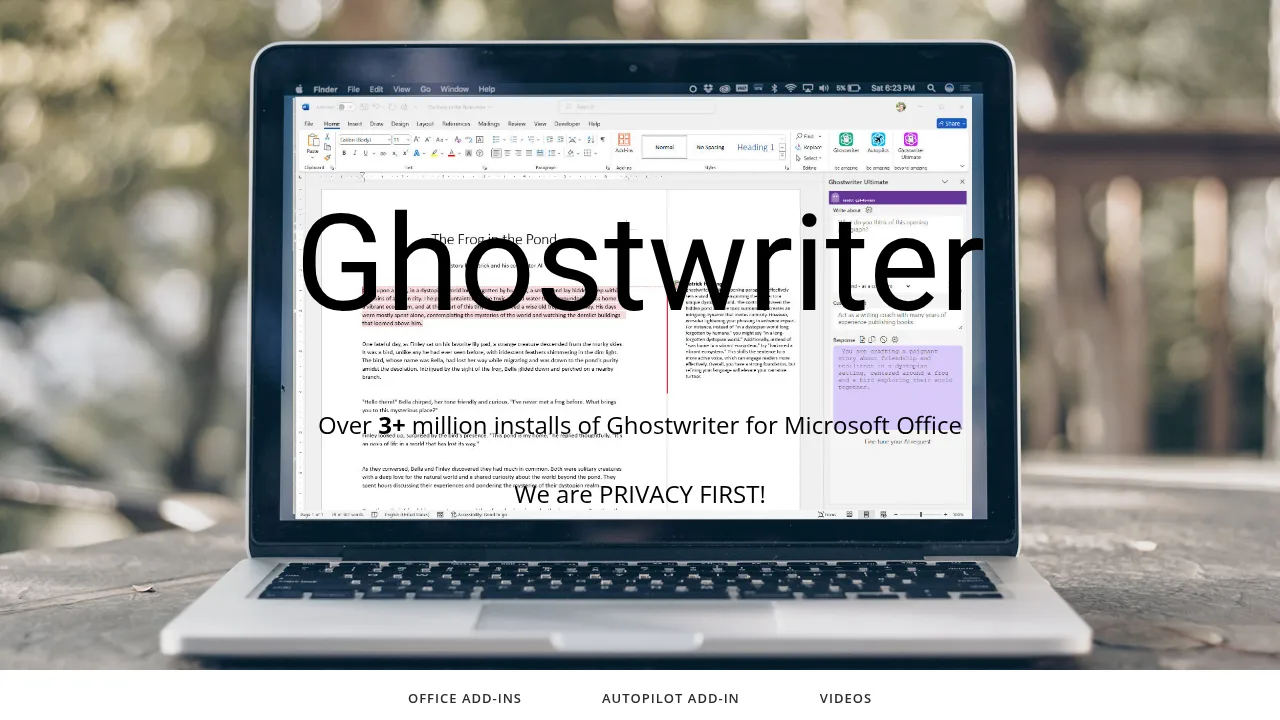
什麼是Ghostwriter Add-ins for Microsoft Office?
Ghostwriter Add-ins for Microsoft Office 是一款安裝於 Word、Outlook、Excel 及 PowerPoint 的 AI 寫作輔助工具,協助使用者生成內容與分析數據。所有方案均為一次性購買,且需額外提供自備 API Key 才能解鎖 OpenAI、Google Gemini 或 xAI Grok 等模型。
Ghostwriter Add-ins for Microsoft Office的特色是什麼?
- 多平台相容性支援 Windows、Mac、網頁版及 iPad 上的 Office 2021/M365/O365 環境。
- 角色與風格設定提供多種 Agents/Personas、寫作風格、語氣及創意設定選項以調整輸出結果。
- 語言翻譯功能PRO、Ultimate、Outlook、Excel、PowerPoint 及專業版皆內建語言翻譯能力。
- 特定應用場景Excel 版可選取表格進行數據分析;PowerPoint 版用於快速生成簡報條列事實;Outlook 版專精於郵件撰寫與回覆。
- 進階編輯介面Ultimate 版本包含互動式介面、Reasoning 模型支援以及 Inline Editing(行內編輯)功能。
Ghostwriter Add-ins for Microsoft Office的使用案例有哪些?
- 學術與基礎寫作Word Basic 版適合各階段學生進行頭腦風暴、規劃及內容創作。
- 法律文件起草Legal Edition 針對律師與律所設計,協助起草文件、研究判例法及摘要複雜資訊。
- 小說與出版創作Author Edition 專注於出版業需求,內建超過 50 種類型與寫作風格,協助創作者完成小說項目。
如何使用Ghostwriter Add-ins for Microsoft Office?
- 啟動插入程式在 Office 功能区列點擊「Get Add-ins」按鈕。
- 搜尋並安裝在商店中搜尋 Ghostwriter 並點擊「Add」進行安裝。
- 輸入授權金鑰購買後取得單一用戶產品金鑰(Product Key)以啟用軟體。
- 連接模型服務在軟體中輸入自備的 API Key 以解鎖對應的 AI 模型功能。
Ghostwriter Add-ins for Microsoft Office定價信息:
- Ghostwriter Word Basic50.00 USD(一次性購買),含寫作風格、語氣、創意設定及回應長度控制。
- Ghostwriter Outlook50.00 USD(一次性購買),含快速操作提示、角色、風格、語氣及 Azure Cognitive Services 支援。
- Ghostwriter Excel50.00 USD(一次性購買),含快速操作提示、角色、語氣、樣本數據生成及語言翻譯。
- Ghostwriter PowerPoint50.00 USD(一次性購買),含快速操作提示、角色、語氣、寫作風格及語言翻譯。
- Ghostwriter Word PRO100.00 USD(一次性購買),增加 50 個 Agents/Personas 及語言翻譯功能。
- Ghostwriter Author Edition100.00 USD(一次性購買),專為出版業設計,含超過 50 種類型與風格。
- Ghostwriter Word Ultimate150.00 USD(一次性購買),包含 100 個 Agents/Personas、AI Prompt Writer 及行內編輯功能。
- Ghostwriter Office Bundle200.00 USD(一次性購買),涵蓋 Excel、Outlook、PowerPoint 及 Word PRO 四個附加元件。
- Ghostwriter Legal Edition250.00 USD(一次性購買),專為法律專業人士設計,包含 Ghostwriter for Outlook 功能。