
What is Andi?
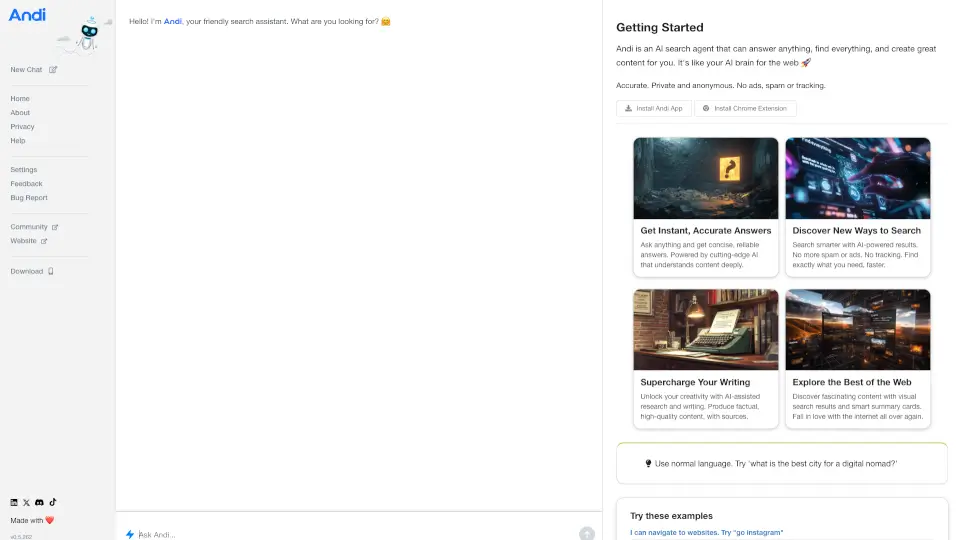
Meet Andi—the next-generation AI search assistant that’s changing how you find information online. Instead of dumping a list of links and leaving you to sort through them, Andi gives you clear, concise answers right away—like chatting with a smart, helpful friend who actually knows what you need.
Built for speed, accuracy, and privacy, Andi cuts through the noise of traditional search engines. Whether you're looking up how to tie a bowtie, hunting for apartments in San Francisco, or exploring the world’s most beautiful cafes, Andi delivers trustworthy results without ads, tracking, or spam. It’s search reimagined for the AI era: smarter, faster, and totally focused on you.
What are the features of Andi?
- Instant AnswersGet direct, reliable responses instead of endless links—perfect for quick facts or complex queries.
- Privacy-First SearchNo tracking, no ads, no data collection. Your searches stay anonymous and secure.
- Smart ShortcutsUse “go” commands (like “go youtube tv” or “go heroku dashboard”) to jump straight to your favorite sites or dashboards.
- AI-Powered ResearchGenerate high-quality content with factual accuracy and cited sources—ideal for students, creators, and professionals.
- Visual Search ResultsDiscover content through smart summary cards and visual previews that make browsing intuitive and engaging.
- Cross-Platform AccessAvailable as a web app, Chrome extension, or installable PWA for seamless use anywhere.
What are the use cases of Andi?
- Students researching for school projects without sifting through unreliable websites
- Professionals quickly accessing cloud dashboards using simple “go” commands
- Travelers finding top-rated beaches or hidden-gem cafes around the world
- Job seekers searching for rental listings in competitive markets like San Francisco
- Content creators drafting reviews or articles with AI-assisted writing and fact-checking
- Everyday users learning new skills—like flirting tips or fashion trends—in seconds
How to use Andi?
- Type your question naturally into the chat box (e.g., “best beaches in the Whitsundays”)
- Use “go [service]” shortcuts to navigate directly to platforms (e.g., “go amazon shoes” or “go hn” for Hacker News)
- Press the up or down arrow keys after typing to browse your search history
- Install the Chrome extension or PWA for one-click access from your browser or home screen
- Explore example prompts on the homepage to discover new ways to search smarter