
What is TopView.ai?
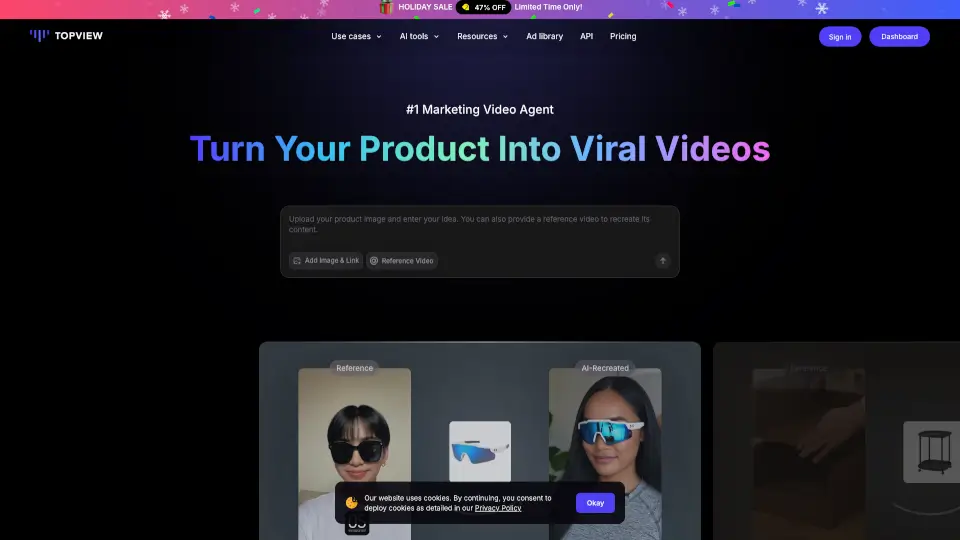
Topview AI is an agent-driven creative platform that helps you turn ideas, scripts, reference videos, or product links into professional films, short dramas, marketing ads, and social media clips. Instead of generating one asset at a time, it gives you a full production workspace—Canvas, Drama Studio, and Board—so you can plan, generate, compare, and refine videos in one place. Whether you're a beginner who just wants to chat with an AI agent or a pro who needs total control over prompts, models, and continuity, Topview AI acts as your personal AI video agent for film-style shorts, micro-dramas, UGC ads, and more.
What are the features of TopView.ai?
- Agentic Canvas: Describe an idea or upload references, and the AI agent plans scenes, generates assets, and keeps the project editable on a free-form canvas. You can chat for guidance or take direct control over each tool.
- Drama Studio: Designed specifically for short dramas and multi-episode storytelling. It breaks down scripts, manages character bibles, scene designs, props, and prompts to keep characters, visuals, and audio consistent across clips and episodes.
- Board – All-in-One Asset Management: Access image, video, audio, and avatar models in one workspace. Group, rate, pin, compare, and batch-operate generated materials for easy review and reuse.
- Reference Video Recreation: Upload any reference video—Topview analyzes its pacing, shot structure, hooks, motion, and visual tone, then recreates that creative direction for your own story, product, or character.
- URL-to-Video: Paste a product URL or campaign brief and instantly turn it into a polished marketing video, explainer, or ad – no scripting needed.
- Localization & Voiceover: Add presenters, voiceovers, captions, and translate into 30+ languages for global campaigns.
- Team Collaboration: Share projects, credits, and assets across your team. Admins can control credit usage and keep production materials organized for enterprise marketing teams, agencies, and studios.
What are the use cases of TopView.ai?
- Film & Short Drama Production: Turn a scene idea, script, or visual reference into cinematic shots with camera movement, lighting, and mood. Use Drama Studio to create multi-episode vertical dramas from novels or rough plots.
- UGC-Style Product Ads: Generate realistic, creator-style product ads with natural hooks, lifelike presenters, and authentic pacing – perfect for TikTok, Instagram, and Meta ad testing.
- Social Media Batch Content: Quickly create short-form videos for Reels, Shorts, and TikTok from one idea or set of assets. Keep brand voice consistent while testing different hooks and aspect ratios.
- Marketing & Promo Videos: Convert a product URL or campaign brief into a polished promo video, comparison clip, or explainer without writing a full script.
- Video Cloning & Remixing: Upload a competitor's viral ad or reference video, and recreate its style, rhythm, and structure for your own brand, product, or story.
- Image-to-Video & Asset Generation: Generate thumbnails, product imagery, character references, and scene concepts that feed directly into your video production pipeline.
- Localized Campaigns: Adapt a single video into multiple language versions with voiceover, captions, and culturally tailored visuals.
How to use TopView.ai?
- Start with an idea, not a script: Describe your concept or upload a reference video to the Canvas. The AI agent will propose scenes and suggest models.
- Choose your mode: For quick marketing videos, use URL-to-Video. For multi-episode dramas, open Drama Studio. For maximum control, use the agentic Canvas to manually adjust each generation tool.
- Add references and assets: Upload character images, product photos, or reference videos to guide the agent's style, pacing, and visual identity.
- Review and refine: Use Board to compare generated clips, pin your favorites, and batch-operate assets. The agent keeps your project editable so you can tweak prompts, camera direction, or scene order.
- Collaborate with your team: Share projects and credits, assign roles, and keep all generated assets organized in one shared workspace.