
What is Power Query?
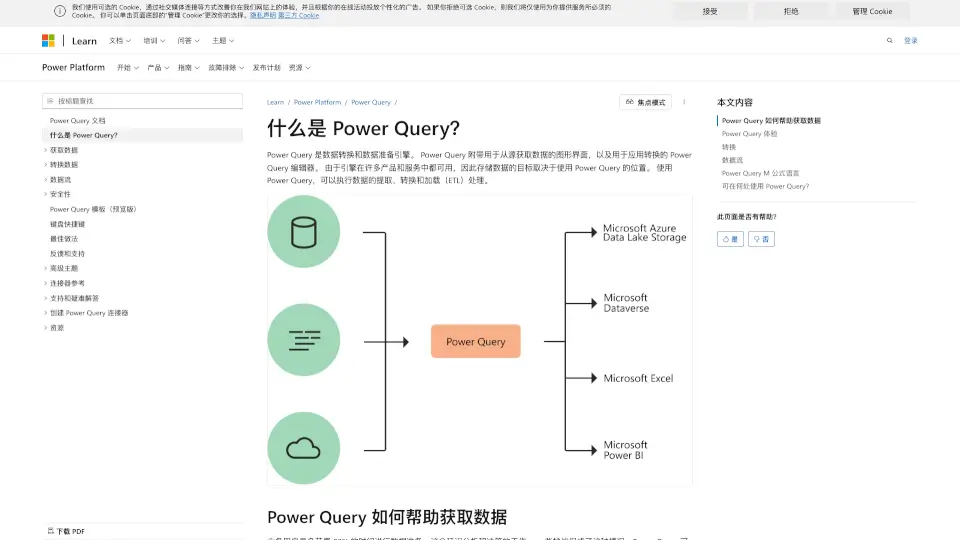
Power Query is a powerful data transformation and preparation engine developed by Microsoft. It helps users easily connect to various data sources, transform data, and load it into their desired destinations. Whether you're working with Excel, Power BI, or other Microsoft products, Power Query simplifies the process of handling data.
What are the features of Power Query?
- Data Connectivity: Connect to hundreds of data sources, including databases, web services, and files.
- Data Transformation: Apply hundreds of transformations like filtering, merging, and pivoting with a user-friendly interface.
- Automation: Create repeatable queries that can be refreshed to get up-to-date data.
- M Language: Use the Power Query M formula language for advanced data transformations.
- Cross-Platform: Available in Excel, Power BI, and other Microsoft services.
What are the use cases of Power Query?
- Business Analysis: Quickly prepare and analyze data for business insights.
- Data Cleaning: Automate the process of cleaning and reshaping messy data.
- Reporting: Streamline the creation of reports by automating data preparation.
- Data Integration: Combine data from multiple sources into a single, unified dataset.
How to use Power Query?
- Open Power Query in Excel or Power BI.
- Connect to your data source (e.g., a database, Excel file, or web service).
- Use the Power Query Editor to apply transformations like filtering, sorting, and merging.
- Load the transformed data into your workbook or report.
- Refresh the query to update the data automatically.