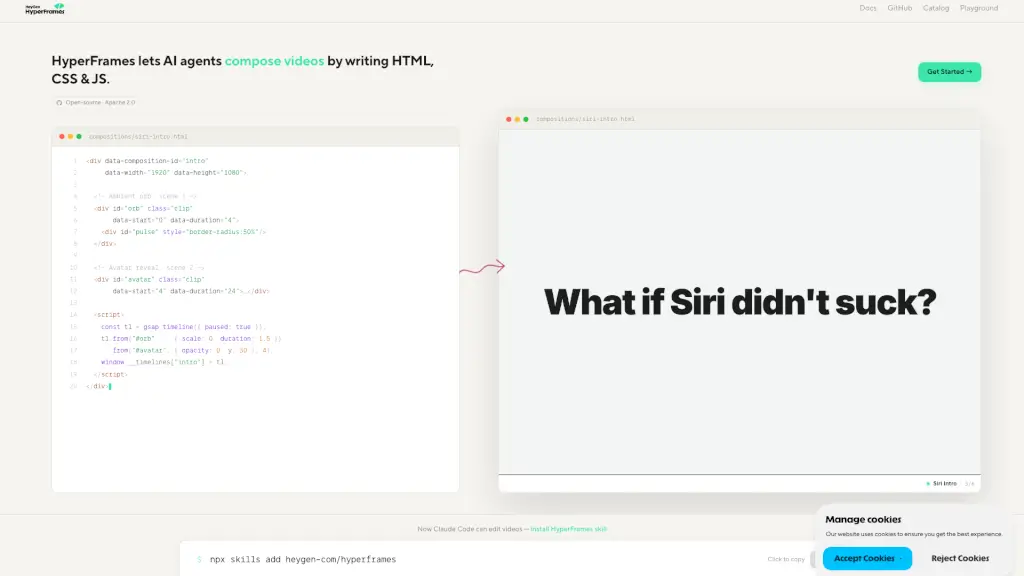
What is HyperFrames?
HyperFrames is an open-source tool that lets AI agents compose videos by writing HTML, CSS, and JavaScript — a concept called "vibe-coding." Originated by HeyGen and built for the community, it’s licensed under Apache 2.0. Instead of traditional video editing software, you describe your video in code, and an AI agent renders it. Whether you're using Claude Code or another AI assistant, HyperFrames turns video editing into a code-first, AI-powered experience.
What are the features of HyperFrames?
- AI Agent Video Composition: AI agents (like Claude Code) can create and edit videos by generating HTML, CSS, and JS code, making video editing fully programmable.
- Vibe-Coding Approach: Edit videos by simply describing what you want in natural language — the AI handles the code and rendering.
- Open Source & Apache 2.0: Free to use, modify, and distribute. No vendor lock-in. Community-driven development.
- Works with Claude Code Skill: Install the HyperFrames skill via
npx skills add heygen-com/hyperframesto let Claude Code edit videos directly. - Live Preview & Playground: Test your compositions in real time with the built-in playground and browse existing examples in the catalog.
- HTML/CSS/JS Powered: Every video is a web page underneath — giving you full control over layout, animations, and interactivity.
What are the use cases of HyperFrames?
- AI-generated social media videos: Describe a short intro or promo, and let the AI compose the video using code.
- Programmatic video editing: Developers can integrate HyperFrames into workflows to generate videos on the fly (e.g., for data visualization, tutorials).
- Rapid prototyping of video content: Use vibe-coding to quickly iterate on video concepts without opening a timeline editor.
- Educational demos: Create interactive video explanations by mixing HTML/CSS/JS with AI-generated narrative.
- Automated video production pipelines: Combine with Claude Code or other AI agents to batch-create videos from text prompts.
- Custom animated intros: Build branded intros (like the Siri Intro example) by writing code once and reusing it.
How to use HyperFrames?
- Step 1: Visit the HyperFrames playground or the GitHub repo to see the basics.
- Step 2: Install the HyperFrames skill for Claude Code by running
npx skills add heygen-com/hyperframesin your terminal. - Step 3: In your AI agent (e.g., Claude Code), describe the video you want in natural language — the agent will write the HTML/CSS/JS composition.
- Step 4: Preview the generated video in the playground or export the final composition.
- Step 5: Share your composition by saving the HTML file or publishing it to the HyperFrames catalog.
- Step 6: Modify the code directly if you need fine-grained control over timing, animations, or styling.