
What is Flixier?
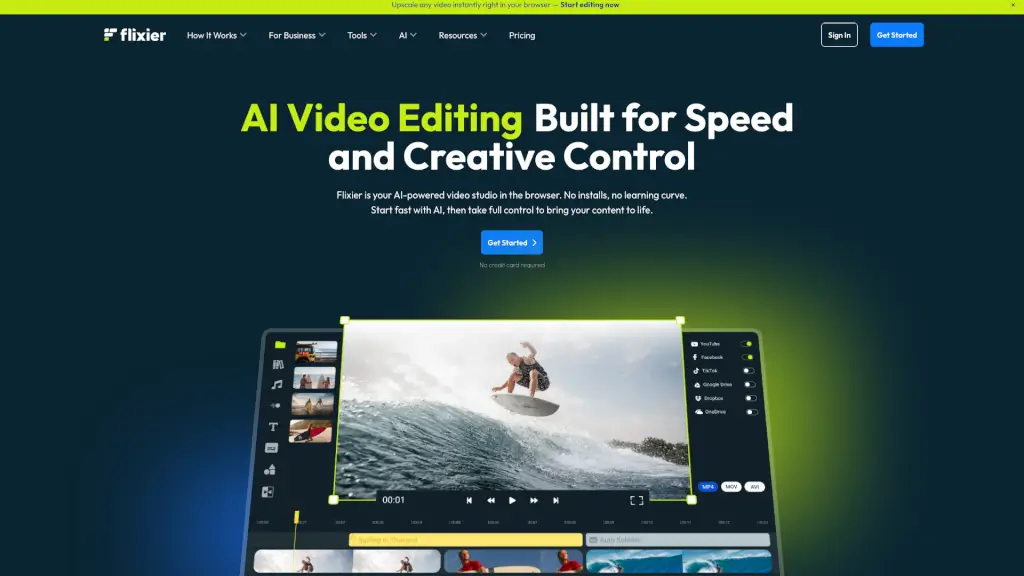
Flixier is a powerful and user-friendly online video editor that makes it easy for anyone to create stunning videos. Whether you're a student, marketer, or educator, Flixier offers a seamless experience with no need for downloads or installations. Just open your browser, and you're ready to start editing. With its intuitive interface and robust features, Flixier empowers you to combine video, transitions, motion text, and sound, making it the perfect tool for both beginners and pros.
What are the features of Flixier?
- AI-Powered Editing: Flixier’s built-in AI helps you generate voiceovers, subtitles, and even kickstart videos from a script, saving you time and effort.
- Cloud-Based Rendering: Enjoy superfast rendering, even on low-spec devices, thanks to Flixier’s cloud-powered technology.
- Real-Time Collaboration: Work with your team in real-time, allowing for seamless brainstorming, editing, and refining of projects.
- Import and Export Flexibility: Import media from the cloud, your device, or the web, and export your videos to any platform with just a click.
- Advanced Editing Tools: Access a wide range of tools including video trimming, cropping, adding text, and more, all in one place.
- No Account Required: Start editing right away without the need to sign up or provide any personal information.
What are the use cases of Flixier?
- Creating Social Media Content: Perfect for making engaging Reels, TikToks, and Shorts with ease.
- Educational Videos: Ideal for teachers and students to create and edit educational content, such as lesson videos and presentations.
- Business Marketing: Marketers can use Flixier to create professional product demo videos, marketing campaigns, and more.
- Training Videos: Businesses can produce training videos for employee onboarding, compliance, and other internal needs.
- Personal Projects: Great for personal projects like birthday videos, wedding invitations, and memorial videos.
- Podcast and Vlog Editing: Edit and enhance your podcast and vlog content with advanced audio and visual tools.
How to use Flixier?
- Add Your Media: Drag and drop your video, images, and audio files into the library.
- Arrange Clips: Place your clips on the timeline in the order you want them to appear.
- Edit and Enhance: Use the tools to cut, trim, crop, and add text, subtitles, and effects.
- Collaborate: Invite team members to join and work on the project in real-time.
- Export Your Video: Click the "Export" button to render and download your finished video.